
Logitech Litra Glow
4.5Editor score
TrueSoft technology
Wide flattering light
USB powered design
Finding the right lighting can transform your broadcast quality significantly. A good key light ensures your face is well illuminated without harsh shadows or glare. It creates a professional look that keeps viewers engaged and focused on your content.
We compared ten top rated models based on brightness, color temperature range, and build quality. Our analysis covers desk mounted panels, clamp on options, and portable kits. Each product was evaluated for ease of use and streaming suitability.
Each pick highlights unique strengths and potential trade-offs for different setups. You will see detailed breakdowns of features and real world performance. Please note that availability and pricing may change frequently over time.
4.5Editor score

4.5Editor score
4.7Editor score
As an Amazon Associate we earn from qualifying purchases.
This side-by-side comparison highlights the core specifications and unique features of each selected light. We focus on brightness output, color range, and mounting options to help you find the ideal match for your desk setup.


The Elgato Key Light stands out as a top tier choice for streamers seeking professional results. With a rating of 4.5 stars it has gained trust among users for its consistent performance. The standout quality is its powerful 2800 lumens output which brightens any workspace effectively.
We may earn a commission when you buy through this link, at no additional cost to you.
Its 160 OSRAM LEDs provide a balanced glow that reduces eye strain. The opal glass face ensures even distribution without glare. You can adjust color temperature from sunset amber to arctic blue via the desktop app. This flexibility helps match room lighting or create specific moods.
While highly effective the light operates with low heat compared to soft boxes. This ensures comfort during long sessions. However the price may be a consideration for new streamers. The need for Wi-Fi connectivity is required for remote adjustments.
This light is ideal for dedicated studios where quality is paramount. It simplifies setup and delivers reliable illumination. If you want a polished look without constant tinkering this is a solid investment. It remains a benchmark for streaming lighting today.
The high lumen count ensures you are visible even in dim rooms. Color accuracy helps your skin tones look natural on camera.
Wi-Fi enables remote adjustments so you can tweak settings without interrupting your stream. The app interface is intuitive for quick changes.
We may earn a commission when you buy through this link, at no additional cost to you.
The Logitech Litra Glow is an excellent entry level option for streamers on a budget. It holds a 4.5 rating and is praised for its TrueSoft technology. This feature delivers balanced light that flatters faces and reduces harsh shadows effectively.
We may earn a commission when you buy through this link, at no additional cost to you.
Its frameless diffuser radiates soft light that is safe for all-day streaming. You can adjust brightness and color temperature easily via the G HUB app. The design includes a flexible mount that attaches to monitors or laptops securely.
While it is not as bright as studio panels it suffices for webcam use. The USB power makes it convenient but limits placement. Some users might find the cable length restrictive depending on desk layout.
This light is perfect for beginners or casual streamers needing quick setup. It offers high quality without complexity. If you want a reliable light that is easy to use it fits the bill well. It is a smart choice for home offices.
TrueSoft ensures your skin looks natural on video. It avoids the washed out look common with cheaper LED panels.
The monitor mount allows you to position the light close to the camera. This reduces shadows and keeps your setup neat.
We may earn a commission when you buy through this link, at no additional cost to you.
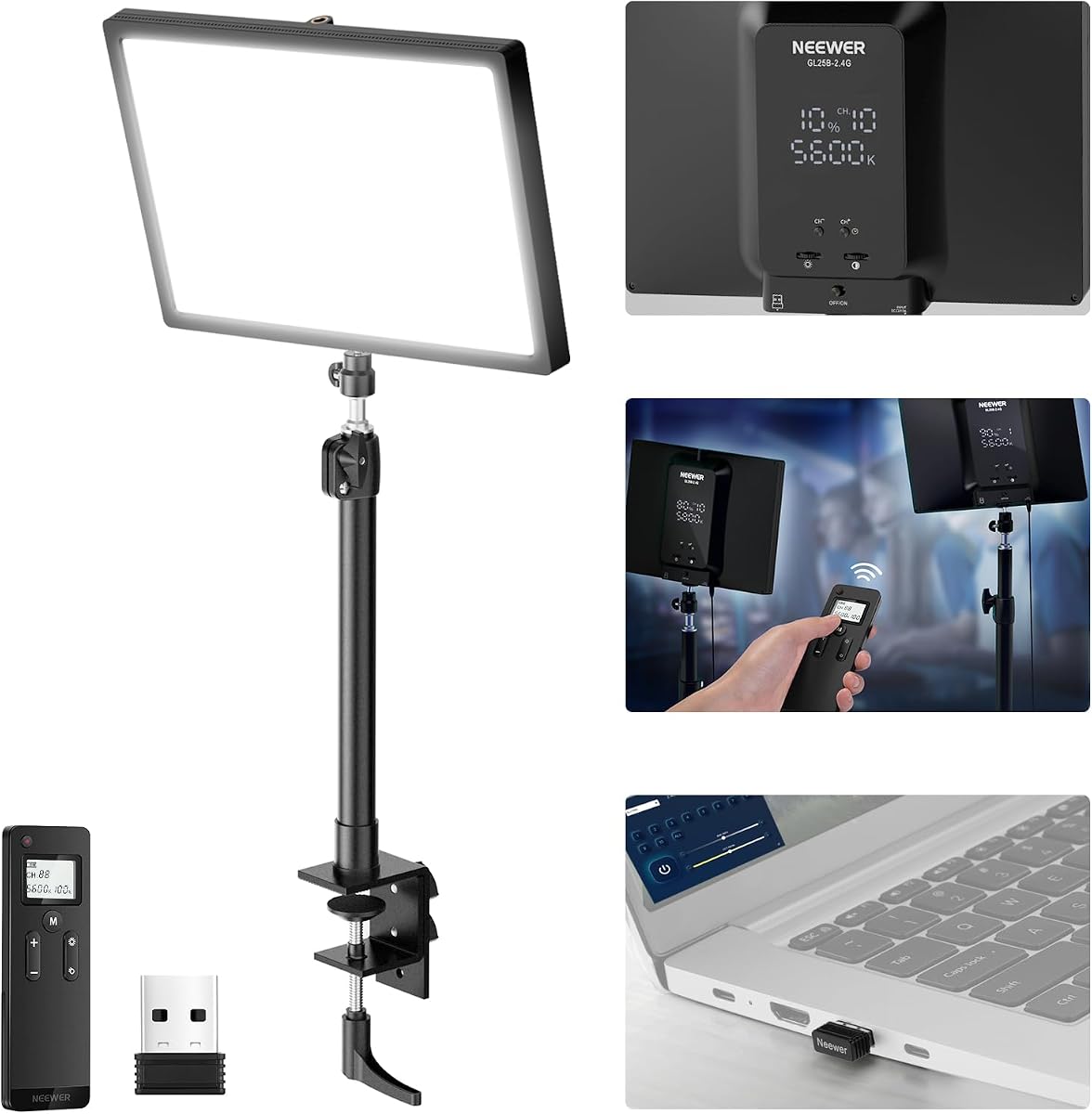
The NEEWER GL25B offers premium performance with a 4.7 rating. It features 176 LEDs and a bright output of 2300lux. This makes it ideal for game live streaming and high quality video recording. The edge emitting soft glow ensures even lighting without glare.
We may earn a commission when you buy through this link, at no additional cost to you.
A key strength is the fanless cooling system which keeps noise to zero. You can control it via a 2.4G remote or PC app. The high CRI of 98+ ensures colors look accurate on camera. This level of detail is rare at this price point.
However it requires a desk clamp which may limit some setups. The panel is large but manageable. Some users might find it slightly bulky for small spaces. Despite this the build quality is robust and reliable for daily use.
Streamers looking for studio grade quality should consider this option. It balances power and convenience well. If you need bright silent lighting it is a top pick. It delivers professional results for content creators and influencers.
The lack of a fan means no noise during recordings. This is crucial for audio clarity in podcasts or voice overs.
With CRI 98+ colors appear true to life. This is vital for product reviews or any content requiring color accuracy.
We may earn a commission when you buy through this link, at no additional cost to you.
The Elgato Key Light Air MK.2 is a sleek option with 2100 lumens. It offers 50% more brightness than the original air model. The edge-lit design prevents glare and keeps the panel slim. Users can control it via touch or the desktop app.
We may earn a commission when you buy through this link, at no additional cost to you.
It supports flexible power including USB-C or battery banks via MagSafe. This versatility is great for mobile setups or limited outlet access. You can automate it with a Stream Deck for instant scene changes. The clamp is adjustable for various desk heights.
However some users report lower satisfaction compared to the main model. The brightness is decent but not top tier. Reviews reflect some inconsistency in performance. It may not suit those needing maximum illumination power.
This light is best for users valuing portability and style. It fits well in modern setups without bulk. If you need a versatile light for travel it is a good fit. It offers solid features for mid-level streaming needs.
USB-C and battery support allow you to use it anywhere. This is useful for remote streams or power outages.
Automation via Stream Deck streamlines your workflow. You can switch lighting profiles with a single button press.
We may earn a commission when you buy through this link, at no additional cost to you.
The Weilisi Ring Light is a versatile desk lamp with a 4.5 rating. It provides uniform diffused light that restores natural visibility. The 360 rotation allows you to position it anywhere on the desk. It is ideal for video conferences and detailed tasks.
We may earn a commission when you buy through this link, at no additional cost to you.
It features a telescoping stand and adjustable head for flexibility. The large metal C-clamp keeps it secure without scratching surfaces. You can adjust brightness and color to suit different needs. It also serves well for reading or podcast recording.
However it is not as bright as panel lights. It is primarily for close range lighting. Some users may find the arm less rigid than expected. But for general use it offers great value and functionality.
This light is perfect for small offices or home setups. It saves space and looks clean on the desk. If you need a multi-purpose light it is a smart choice. It simplifies your workspace lighting effectively.
Rotation helps you direct light where needed without moving the base. This is great for shifting focus during a session.
The clamp frees up valuable desk space. It keeps your area tidy and organized while providing light.
We may earn a commission when you buy through this link, at no additional cost to you.
The NiceVeedi Studio Kit provides two panels with tripods in one package. It is a good value for those needing fill and key lights. The stands extend to 73 inches allowing overhead or side placement. Each panel has 356 LEDs for stable output.
We may earn a commission when you buy through this link, at no additional cost to you.
It includes phone holders and a storage bag for convenience. You can dim brightness and adjust color from 2800K to 6500K. The USB power means you can run them from a laptop or charger. CRI of 97+ ensures accurate color rendering.
However the stands are lightweight and may not suit windy outdoor use. The panels are compact which limits reach. Some users might want more rigidity in the construction. But for indoor streaming it is very practical.
This kit is great for dual setups or budget buyers. It gives you two lights to play with easily. If you want flexibility in positioning it is a solid option. It covers basics for YouTube and live streaming well.
Getting two lights allows for better depth and shadow control. You can balance light across your background effectively.
Phone holders let you record mobile content easily. It simplifies the process for vertical video creators.
We may earn a commission when you buy through this link, at no additional cost to you.
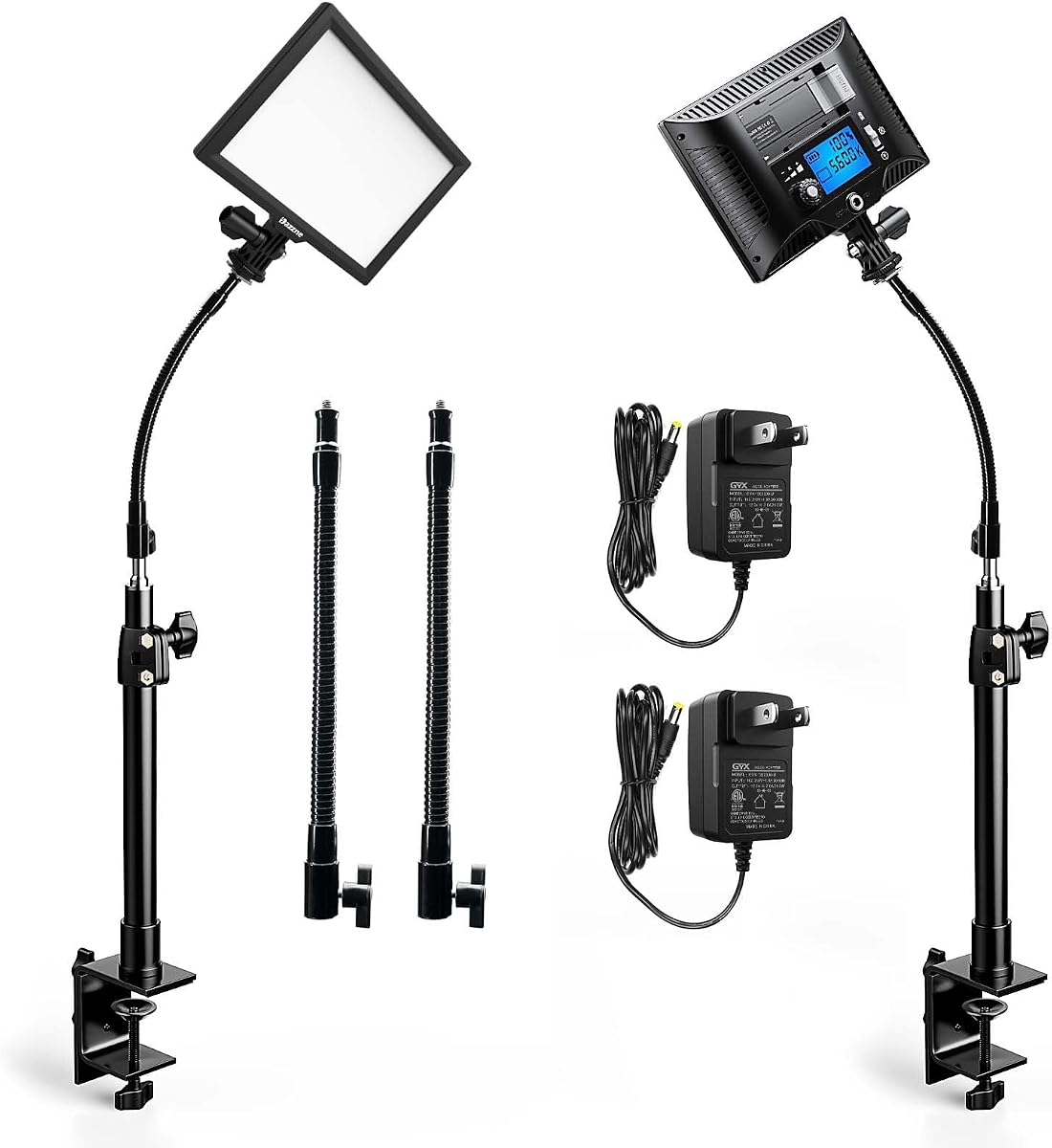
This kit offers two lights with gooseneck tubes for flexible angles. With a 4.8 rating it is highly rated by users for ease of use. The LCD screen shows brightness and color settings clearly. You can adjust settings easily without guessing.
We may earn a commission when you buy through this link, at no additional cost to you.
Each panel is 16W and provides 1080lux of light. The clamp stand fits various desk thicknesses and saves space. The tubes allow you to bend light to exact positions. It is ideal for podcasts and Zoom calls where positioning matters.
Some users note brightness may be limited for large rooms. The gooseneck can bend under its own weight over time. But the memory function and LCD make it user friendly. It is a smart tool for specific desk tasks.
This kit suits streamers needing flexible positioning. It offers value with two lights in one. If you want easy adjustments it is a top pick. It works well for tight desk setups.
The tubes allow you to direct light precisely. This helps avoid glare on screens or glasses.
An LCD screen helps you see settings at a glance. It is faster than feeling buttons without feedback.
We may earn a commission when you buy through this link, at no additional cost to you.
The Godox ES45 uses an OLED panel for soft even light. It holds a 4.4 rating and focuses on reducing eye fatigue. The design is optimized for long sessions without strain. A magnetic remote charges automatically when attached to the panel.
We may earn a commission when you buy through this link, at no additional cost to you.
You can adjust brightness and color from 2800K to 6500K. The clamp fits desks up to 2 inches thick. Cables stay hidden for a tidy look. The app allows group control for multiple lights if needed.
Some may find the panel size moderate for wide coverage. The remote charging relies on magnetic contact. But it reduces battery waste and improves convenience. It is well built for home studio use.
This light is great for those seeking comfort. It helps maintain a professional appearance on camera. If you want a clean setup it fits well. It is a reliable choice for daily streaming.
The soft light reduces strain during long hours. This helps you stay focused and comfortable.
The remote stays charged without needing replacement. It simplifies control and saves effort.
We may earn a commission when you buy through this link, at no additional cost to you.
This 2Pack kit gives you two gooseneck lights for your desk. It has a 4.4 rating and focuses on convenience. The LCD screen shows settings clearly and remembers your last choice. The clamp holds steady for various desk thicknesses.
We may earn a commission when you buy through this link, at no additional cost to you.
Each light uses 118 LEDs and provides soft flicker free illumination. The tubes let you angle them exactly where needed. It is designed for streaming podcasting and zoom calls. The build ensures stable output for your sessions.
Users may find the brightness moderate for large areas. It is better for focused light on the subject. Some may need to manage extra cables. But for desk use it is very functional and easy.
This kit is ideal for users needing multiple angles. It provides value with two lights included. If you want flexible desk lighting it works well. It covers essential needs for creators.
Two lights allow for fill and key options on a desk. This balances the scene better than one source.
Flicker free output prevents banding on video. It ensures smooth visuals for your viewers.
We may earn a commission when you buy through this link, at no additional cost to you.
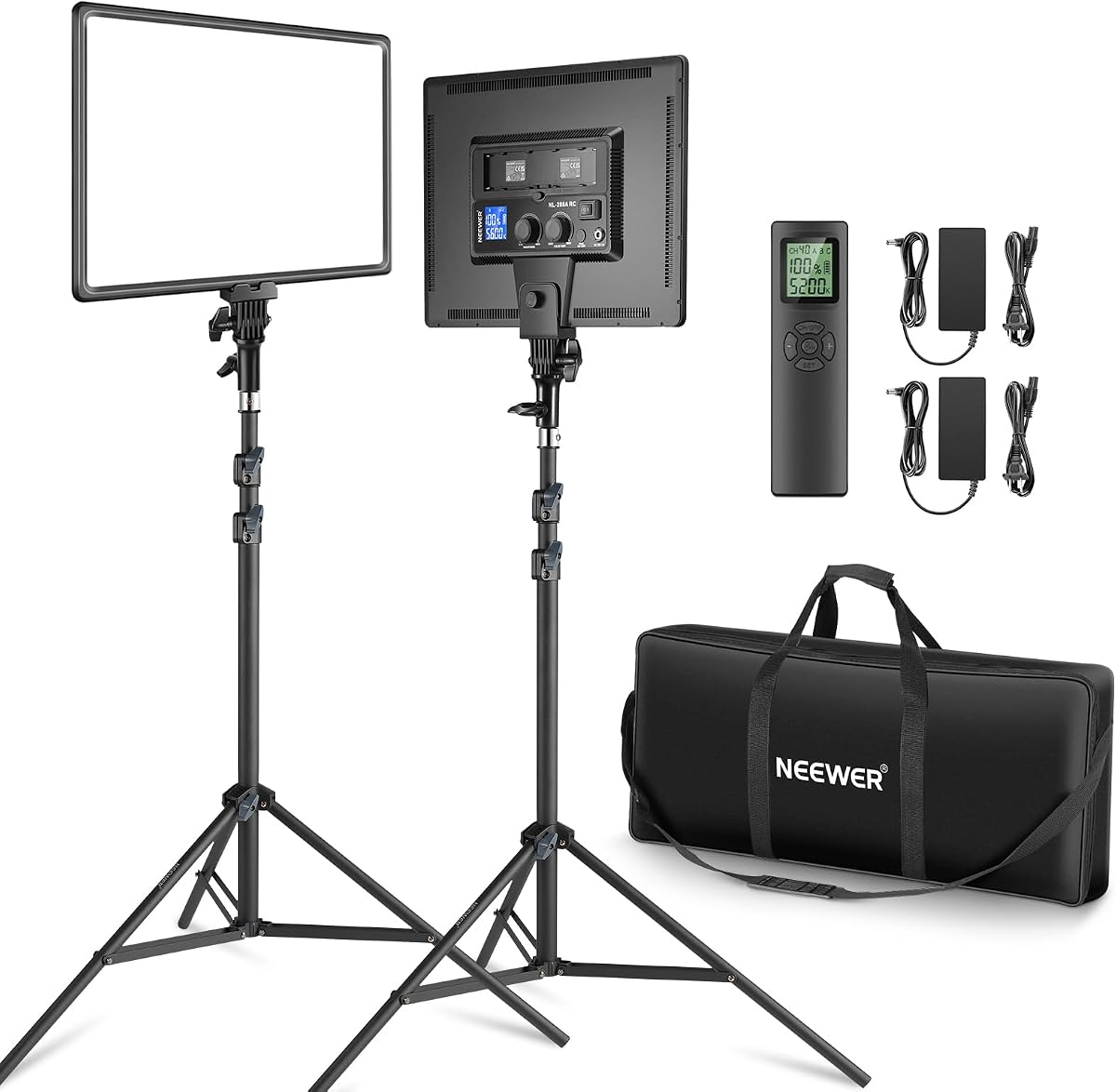
The Neewer 18 Inch Kit delivers high output with 45W panels. It holds a 4.6 rating and offers 4800Lux brightness. This is powerful enough for studio photography and live streaming. The CRI 97+ ensures accurate colors in your shots.
We may earn a commission when you buy through this link, at no additional cost to you.
It includes two tripods and a remote for channel control. You can use AC power or Sony NP-F batteries. This dual power means you can work anywhere. The panels are portable yet deliver strong light.
However batteries are not included which adds to cost. The stands are sturdy but heavy to carry. Some users may need more accessories for mounting. But it is a robust choice for professionals.
This kit is great for serious creators. It balances power and portability well. If you want high brightness it is a top pick. It serves many lighting scenarios effectively.
4800Lux allows for well lit large scenes. It supports high resolution cameras easily.
Battery support lets you shoot off grid. This is useful for on location work.
We may earn a commission when you buy through this link, at no additional cost to you.
Selecting the right light involves understanding your space and streaming needs.
Brightness is measured in lumens or lux. Higher output allows you to fill a larger space effectively. For small desks 2000 lumens may suffice but larger rooms need more.
Look for at least 2000 lumens for clear visibility.
Color temperature ranges from warm to cool. A wide range lets you match your room or change moods. 2800K to 6500K is standard for streaming.
Ensure your light covers 2800K to 6500K for flexibility.
CRI indicates color accuracy. A high CRI means skin tones look natural. 90+ is recommended for professional results.
Choose a light with CRI of 90 or higher.
Mounts affect where you can place the light. Clamp on saves space while stands offer height. Decide based on your desk layout.
Select a mount that fits your desk size.
Power sources vary from USB to AC. USB is portable but may lack power. AC offers stable output for long sessions.
Check power needs before purchase.
Remotes allow you to adjust without interrupting. Look for app or button control. This saves time during streams.
Remote control enhances workflow efficiency.
Build affects durability. Metal panels last longer than plastic. Good cooling prevents overheating.
Prioritize metal panels and good cooling.
Price varies but features matter. A higher cost may include better materials. Compare features to budget.
Compare features to find best value.
Place the light above eye level to avoid harsh shadows. Aim it at a 45 degree angle to your face.
Clean the panel with a soft cloth to remove dust. Keep vents clear to prevent overheating.
Store lights in a dry place. Avoid dropping panels to prevent LED damage.
Ideally you want at least 2000 lumens for clear visibility. This ensures your face is well lit even in dim rooms. Brighter lights help reduce noise on video.
A high CRI ensures colors look natural. For streaming 90 or higher is recommended. This helps your skin tones appear accurate on camera.
Yes many desk lights work well for streaming. Look for ones with adjustable color and brightness. Clamp styles save space effectively.
Position the light to one side and aim slightly down. Use a diffuser if possible. This reduces reflections on monitors.
Wi-Fi adds convenience for remote adjustments. But basic control works via buttons. Decide based on your workflow needs.
LED lights run cooler than incandescent bulbs. But ventilation still matters. Check for fans or vented panels for safety.
Some models support battery power. Check for USB or DC options. This allows portable use without outlets.
Larger panels cover more area. 12 to 15 inches is standard. Choose based on your room size.
We reviewed ten options from budget friendly to premium studio kits. The Elgato Key Light and NEEWER GL25B stood out for their quality.
Prioritize brightness and color accuracy to ensure you look your best. Also consider mounting and control options that fit your workspace.
Remember to check current availability and pricing before buying. Our guide helps you make an informed choice today.