
G32P UHD 6K
4.6Editor score
10-Bit Color
High PPI Clarity
Ergonomic Stand
Finding the right display is critical for modern creative work. A 6K monitor offers exceptional pixel density, sharp text, and vibrant colors that elevate productivity. Whether you edit video, design graphics, or manage complex data, the right screen transforms your workflow and visual clarity.
We evaluated ten leading 6K models based on panel technology, color gamut coverage, connectivity options, and ergonomic design. Each product was analyzed for its suitability across different professional needs, ensuring our recommendations align with real-world demands for accuracy and performance in high-resolution environments.
Every pick highlights specific strengths like touch functionality, refresh rates, or hub capabilities. While we focus on features and specs, remember that availability and pricing can fluctuate. Check current listings for the latest deals before making your final decision on a new high-resolution display setup.
4.6Editor score

3.9Editor score

4.5Editor score
As an Amazon Associate we earn from qualifying purchases.
The following table provides a side-by-side look at the key specifications and features of each monitor to help you quickly identify the model that fits your specific workspace and performance needs.




The ASUS ProArt PA32QCV is a top choice for creatives seeking high-resolution precision. It offers a 32-inch 6K display with IPS technology and strong color coverage. The built-in features ensure it stands out in professional workflows.
We may earn a commission when you buy through this link, at no additional cost to you.
Its factory calibration delivers Delta E under two accuracy out of the box. The M3-P3 Color Preset Mode ensures seamless integration with Apple devices. Connectivity is robust with dual Thunderbolt 4 ports supporting up to 96W delivery.
While highly capable, users should note it requires specific cable configurations for full performance. The price reflects its professional-grade build but may be steep for casual users. However, the extended warranty adds value over time.
If you work in design or video editing on Mac, this monitor fits perfectly. It eliminates guesswork in color management and reduces clutter with its KVM switch. It is a reliable investment for long-term creative projects.
The dedicated preset mode ensures colors on the monitor match what you see on your MacBook screen.
Use the built-in KVM switch to control two laptops with one keyboard and mouse instantly.
We may earn a commission when you buy through this link, at no additional cost to you.
The Dell 52-Inch 6K monitor provides a cinematic 21:9 aspect ratio for expansive workspaces. Its IPS Black panel ensures deep blacks and vibrant colors. The curved design enhances immersion for long viewing sessions.
We may earn a commission when you buy through this link, at no additional cost to you.
With 120Hz refresh rate, it supports smooth motion for video and design tasks. The Thunderbolt Hub delivers up to 140W power, charging laptops efficiently. Multiple ports allow connecting various peripherals without dongles.
However, the physical size requires a significant desk space. The price is on the higher end compared to smaller models. Still, for multi-monitor replacement, it offers unmatched utility in a single unit.
This model suits professionals needing wide spreadsheets or timeline views. It combines productivity with visual quality effectively. Ensure your desk can accommodate the wide form factor before purchasing.
Hardware low blue light and ambient sensors adjust brightness to reduce eye strain.
Use Picture-by-Picture to view two PC feeds simultaneously on one screen.
We may earn a commission when you buy through this link, at no additional cost to you.
The G32P delivers stunning clarity with its 223 PPI density. It features a 6K IPS panel with excellent color reproduction. The glossy finish makes images pop for creative work.
We may earn a commission when you buy through this link, at no additional cost to you.
Its 10-Bit color depth ensures smooth gradients. The 500-nit brightness supports HDR content well. Connectivity includes high-speed ports for seamless multitasking with peripherals.
Some users might find the glossy surface prone to glare in bright rooms. However, the anti-glare coating helps minimize this. The aluminum body ensures durability and a sleek look.
This is a smart choice for those prioritizing image quality on a budget. It balances performance and cost effectively. Ideal for photo editing or graphic design where detail matters.
The 178-degree viewing angle maintains consistent colors from side to side.
Single cable charging up to 100W keeps your desk clutter-free.
We may earn a commission when you buy through this link, at no additional cost to you.
The Samsung Odyssey G8 brings 6K resolution to gaming. It offers a Dual Mode for high refresh rates. The Fast IPS panel ensures quick response times.
We may earn a commission when you buy through this link, at no additional cost to you.
HDR10+ support enhances depth and contrast in games. NVIDIA G-Sync compatibility reduces tearing. Multiple input options streamline your console or PC setup.
While great for gaming, it might not be optimized for color-critical design. Some find the menus complex to navigate initially. Yet, the visual performance is top-tier for entertainment.
If you want high res gaming, this is a strong pick. It balances speed and resolution. Ensure your GPU can handle 6K performance fully.
Near-instant 1ms response reduces ghosting during fast-paced action.
DisplayPort 2.1 and HDMI 2.1 support latest gaming standards.
We may earn a commission when you buy through this link, at no additional cost to you.
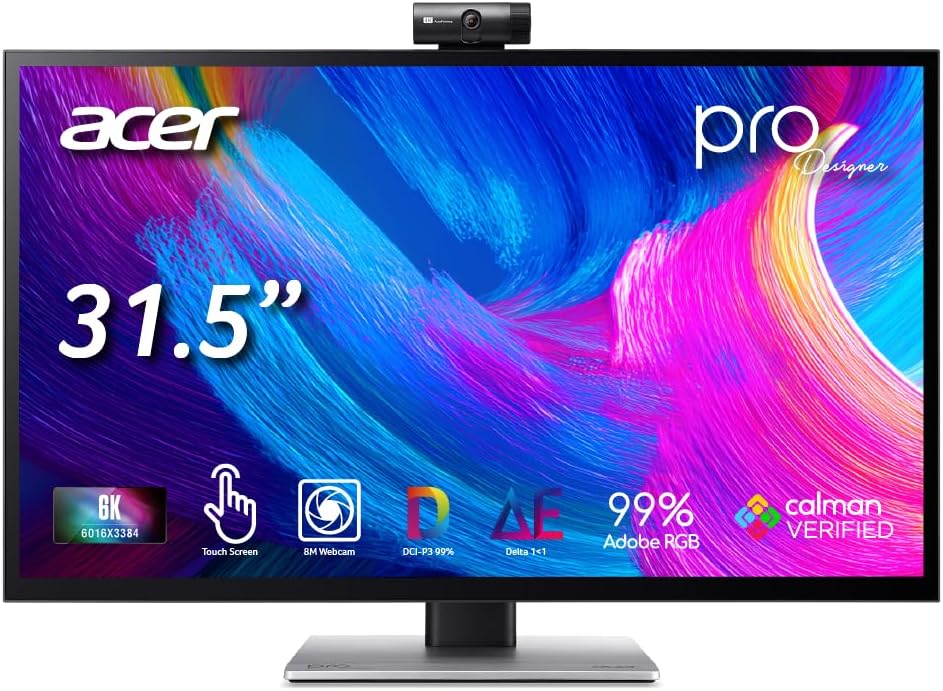
The Acer ProDesigner allows you to draw directly on the screen. It supports 4096 pressure levels for natural sketching. A built-in webcam reduces external hardware needs.
We may earn a commission when you buy through this link, at no additional cost to you.
Factory calibration ensures Delta E under one accuracy. The QD-IPS panel delivers vibrant colors. Creator Hub software simplifies color space management.
Touch interaction requires a learning curve for some. However, it speeds up annotation and retouching tasks. The ergonomic stand allows precise positioning.
This is perfect for designers needing direct input. It merges display and drawing tool efficiently. Check if the stand fits your desk layout.
Sketch ideas directly on the canvas without needing a separate tablet.
An 8MP webcam and mic array handle calls without extra gear.
We may earn a commission when you buy through this link, at no additional cost to you.
The G32X focuses on a clean minimalist look. It offers 218 PPI density for sharp text. The aluminum body ensures a premium feel.
We may earn a commission when you buy through this link, at no additional cost to you.
Anti-glare coating reduces reflections effectively. Connectivity includes high-speed ports for multitasking. The stand supports height and pivot adjustments.
While lacking unique features, it excels in simplicity. It suits users wanting a distraction-free screen. The design fits well in modern offices.
Choose this for pure visual clarity and style. It balances function and form well. Verify compatibility with your preferred mount arm.
218 PPI provides sharp details for work and entertainment.
VESA support allows third-party monitor arms for flexibility.
We may earn a commission when you buy through this link, at no additional cost to you.
This model offers a specialized ultrawide 6K resolution. It supports 120Hz refresh rate for smooth visuals. Dual HDMI 2.2 ports enhance connectivity options.
We may earn a commission when you buy through this link, at no additional cost to you.
Power delivery reaches up to 140W for fast charging. The KVM function helps manage multiple systems. Dell software aids in color management.
The resolution is wider than standard 6K monitors. Users may need to adjust scaling for specific apps. However, it fits specialized workflows well.
Ideal for financial or data analysts needing horizontal space. It balances resolution and utility. Check app compatibility before purchase.
Power delivery up to 140W handles high-performance laptops easily.
Remote control lets you switch inputs without reaching for the bezel.
We may earn a commission when you buy through this link, at no additional cost to you.
The LG UltraFine evo brings Nano IPS Black technology. It ensures deep blacks alongside vibrant colors. Thunderbolt 5 offers 80Gbps data transfer speeds.
We may earn a commission when you buy through this link, at no additional cost to you.
99.5% Adobe RGB coverage is great for print work. VESA DisplayHDR 600 enhances visual realism. Built-in speakers add convenience for calls.
It is a premium choice for critical workflows. The price is significant but justified by performance. Daisy chaining allows multiple displays seamlessly.
Best for professional studios needing high fidelity. It sets a benchmark for color quality. Ensure your device supports Thunderbolt 5 fully.
Thunderbolt 5 delivers data transfer up to 80 gigabits per second.
99.5% Adobe RGB ensures print approvals match screen colors.
We may earn a commission when you buy through this link, at no additional cost to you.
The Dell UltraSharp focuses on business dependability. It features 450 Nit brightness for well-lit areas. The bundle includes a two-year service protection plan.
We may earn a commission when you buy through this link, at no additional cost to you.
USB-C allows quick data transmission for convenience. 5ms response time makes it decent for action or light gaming. Standard ports work with most devices.
It lacks advanced HDR features found in competitors. However, reliability and support make it a safe bet. The bundle offers peace of mind for offices.
Choose this for stable corporate environments. It meets daily needs without overcomplicating things. Ensure the service plan meets your insurance requirements.
Enhanced Protection Pack offers 2 years of support for your display.
Includes Mini DisplayPort and USB 3.2 cables in the box.
We may earn a commission when you buy through this link, at no additional cost to you.
This model is a renewed option without a stand. It offers 52-inch curved display for wide productivity. The 120Hz rate ensures smooth motion.
We may earn a commission when you buy through this link, at no additional cost to you.
It fits well in setups with existing monitor arms. The aspect ratio supports multitasking. It connects via Thunderbolt 4 Hub.
Check the renewed condition before buying. Ensure your VESA mount matches specifications. It suits budget-conscious professionals needing space.
Select this if you prefer custom mounting. It saves cost on stands. Verify seller ratings for quality assurance.
Renewed status offers savings for those with existing mounts.
21:9 aspect ratio allows side-by-side window viewing.
We may earn a commission when you buy through this link, at no additional cost to you.
Selecting a 6K monitor involves balancing resolution, color accuracy, and connectivity for your specific workflow needs.
IPS panels offer wide viewing angles and consistent color which is vital for design work. IPS Black technology improves contrast ratios making dark scenes look deeper.
Choose IPS for general creativity or OLED for extreme contrast.
Look for monitors covering 99% sRGB and 98% DCI-P3 to ensure accurate reproduction across media. Adobe RGB coverage is necessary for print professionals.
Verify color specs match your specific output requirements.
Thunderbolt 4 or 5 allows single-cable charging and high-speed data transfer. HDMI 2.1 and DisplayPort 2.1 support 6K at high refresh rates for gaming.
Ensure your laptop ports match the monitor inputs.
60Hz is standard for productivity and color work but 120Hz provides smoother motion for video and gaming. Higher refresh rates can improve user comfort.
Consider 120Hz if you switch between work and media.
Adjustable stands with tilt, swivel, and height help reduce strain during long sessions. VESA mount compatibility allows using custom monitor arms.
Prioritize adjustable stands for health and comfort.
VESA DisplayHDR 600 ensures good performance with HDR content and daylight visibility. Higher nits make colors pop in bright environments.
Aim for 450 nits or higher for reliable brightness.
Touch capability is essential for illustrators or designers sketching directly on screen. Look for high-pressure levels for natural feel.
Check if styluses are included or sold separately.
Built-in KVM switches let you control multiple computers with one keyboard. Webcams and microphones simplify remote meetings.
These features can reduce desk clutter significantly.
Always use certified cables like Thunderbolt or HDMI 2.1 to support full 6K resolution and refresh rates. Check device compatibility before connecting to ensure proper signal output.
Calibrate your display periodically using hardware tools to maintain color accuracy. Use factory presets like DCI-P3 to match professional standards consistently.
Clean the screen with a soft microfiber cloth to avoid scratches. Avoid harsh chemicals and ensure the monitor is off before cleaning.
Yes, rendering 6K resolution requires significant graphics power. Ensure your GPU and system RAM can handle high-resolution outputs without lag. For 6K gaming, high-end hardware is essential.
Absolutely. The high pixel density allows for precise frame-by-frame editing and color grading. It also reduces the need for constant zooming during complex projects.
Yes, most modern 6K monitors support macOS via USB-C or Thunderbolt. Apple devices can output 6K natively when paired with the correct adapter or direct cable.
IPS Black panels significantly improve contrast ratios compared to traditional IPS. This results in deeper blacks and more vivid colors for a more immersive viewing experience.
For productivity and design work, 60Hz is usually sufficient. However, if you want smooth motion for scrolling or gaming, look for 120Hz or higher options.
Yes, you can use a 6K monitor as a secondary screen. Ensure your GPU supports multiple high-resolution outputs simultaneously. Daisy-chaining via Thunderbolt can simplify setups.
The ASUS ProArt PA32QCV stands out for Mac users, while the G32P offers great value. For premium color needs, the LG UltraFine evo is a top contender.
Prioritize color accuracy and connectivity based on your primary workflow. A monitor with Thunderbolt support simplifies cabling and power delivery effectively.
Prices and stock fluctuate often so check current listings before buying. Ensure the chosen model aligns with your specific workspace constraints.