
GEEKOM IT13 MAX AI
4.6Editor score
Intel Ultra 9 185H NPU
65W Sustained Performance
Triple 4K Video Editing
This guide compares the top Intel Core i9 Mini PC models for power users seeking compact performance, multi-screen support, and efficient workstation capabiliti
The market for compact computing has evolved significantly with powerful processors fitting into tiny chassis. An Intel Core i9 Mini PC delivers desktop-class performance while saving valuable desk space for modern workflows and home offices.
We evaluated ten leading models based on processing power, thermal management, connectivity options, and overall build quality. Our analysis focuses on real-world usability for creative professionals, developers, and power users needing high-speed multitasking.
Each pick highlights specific strengths like expansion slots, network speed, or cooling efficiency. Prices and availability fluctuate frequently so please verify current details before purchasing to ensure you get the best value for your specific needs.
4.6Editor score

4.5Editor score

4.5Editor score
The following table provides a side-by-side overview of key specifications for all ten selected models to help you quickly identify the device that matches your performance and connectivity requirements.


The MINISFORUM M1-1390 stands out as a top contender with its Intel Core i9-13900HX processor delivering 24 cores and 32 threads. This configuration allows it to handle complex workloads smoothly making it ideal for video editing and software development.
We may earn a commission when you buy through this link, at no additional cost to you.
Its robust connectivity includes 2.5G LAN and Wi-Fi 6E ensuring fast network speeds essential for large file transfers. The ability to drive three 4K displays simultaneously significantly boosts productivity for professionals who need multiple workspaces.
While the use of DDR4 RAM is a minor drawback compared to newer models the 32GB capacity is sufficient for most heavy tasks. The compact chassis hides impressive power and fits neatly into office setups without cluttering the workspace.
Buyers seeking a powerful home workstation or office machine will find this model offers the best balance of performance and form factor. It effectively brings flagship desktop capabilities into a tiny package that fits anywhere.
With 8 performance cores and 16 efficiency cores the hybrid architecture intelligently manages background tasks ensuring foreground applications run at peak speed without interruption.
The dual M.2 slots allow users to expand storage up to 8TB which is perfect for media libraries and project files without needing external drives.
We may earn a commission when you buy through this link, at no additional cost to you.
The Beelink GTi13 distinguishes itself by offering a PCIe slot for external GPU expansion which is rare in mini PCs. This feature appeals to power users needing graphical power that internal chips cannot provide for heavy rendering or simulation.
We may earn a commission when you buy through this link, at no additional cost to you.
Equipped with DDR5 RAM the system benefits from faster data transfer rates improving application load times and overall responsiveness. The inclusion of a fingerprint sensor adds a layer of security suitable for business environments.
The AI voice interaction feature allows for smart home control and conference commands making it a versatile tool for modern automated offices. However the cost reflects these premium features and may not suit budget constrained buyers.
Ideal for tech enthusiasts who want to push the limits of mini PC performance this unit offers a unique path to scalability. It bridges the gap between compact design and workstation level versatility effectively.
Built-in voice recognition allows for hands free control which is convenient for smart home integration and multi-person conference calls without needing extra peripherals.
Support for Thunderbolt 4 ensures that high bandwidth peripherals can be connected directly allowing for 4K output and fast data transfer simultaneously.
We may earn a commission when you buy through this link, at no additional cost to you.
Featuring the 14th Gen Intel Core i9-14900HX this model delivers the latest architecture performance in a very compact chassis. The boost clock reaches up to 5.8GHz providing significant speed advantages for single threaded tasks.
We may earn a commission when you buy through this link, at no additional cost to you.
The cooling system uses dual copper heat pipes to maintain stability under load ensuring the processor runs at peak frequencies without throttling. Its slim profile makes it incredibly unobtrusive on a crowded desk surface.
While it uses DDR4 the system remains highly responsive for most professional applications. The inclusion of lifetime technical support adds value for users who prioritize long term reliability and help.
This device is perfect for gamers and professionals who need raw processing speed in a minimal footprint. It proves that modern mini PCs can compete with traditional towers in terms of processing power and efficiency.
The all-copper structure enhances thermal conductivity significantly boosting heat dissipation to keep the system cool even during demanding gaming or rendering sessions.
Measuring just 1.63 inches tall this mini PC fits easily behind monitors or in tight cabinets freeing up valuable workspace for other essential tools.
We may earn a commission when you buy through this link, at no additional cost to you.
The NAB9S offers the most accessible entry point into Core i9 territory without sacrificing core performance capabilities. It is an excellent choice for users who need high multi core speed but have budget constraints.
We may earn a commission when you buy through this link, at no additional cost to you.
Its ability to support four independent displays makes it a strong candidate for multi monitor trading setups or control rooms. The dual 2.5G Ethernet ports are a standout feature for network segmentation.
Starting with 16GB RAM and 500GB SSD the system is easy to upgrade thanks to the tool-free design. This allows users to tailor the storage and memory to their exact needs over time.
For small businesses or home users needing reliable office performance this model delivers the best value proposition. It proves that power does not always require a premium price tag if you choose wisely.
Two 2.5G Ethernet ports enable advanced networking setups like firewall configurations or network storage aggregation which is rare at this price point.
The tool-free top cover makes swapping storage and memory incredibly easy allowing users to upgrade their system without voiding warranties or needing tools.
We may earn a commission when you buy through this link, at no additional cost to you.
This unit is designed as a true workstation with enterprise features like vPro support for remote management and advanced security. It is built for environments where reliability and manageability are paramount for IT departments.
We may earn a commission when you buy through this link, at no additional cost to you.
The 10Gbps SFP+ ports provide massive network throughput making it ideal for NAS servers or high speed data centers. The PCIe 4.0 x16 slot allows for discrete graphics card installation.
Storage flexibility is unmatched with support for three M.2 drives and U.2 NVMe options for massive capacity. This ensures that data intensive workflows never get bottlenecked by drive speeds or limits.
Pros and who need server grade reliability and speed in a desktop form factor will find this model unmatched. It effectively bridges the gap between a workstation and a compact server solution perfectly.
Intel vPro support enables remote management and hardware level security which is critical for businesses protecting sensitive data and maintaining system integrity.
Support for multiple drive types including U.2 NVMe allows for massive capacity setups without needing external enclosures or complex cabling.
We may earn a commission when you buy through this link, at no additional cost to you.
The GEEKOM IT13 MAX AI is built for the emerging era of local AI computing with a powerful NPU dedicated to acceleration. This allows users to run language models and AI tools locally without cloud privacy concerns.
We may earn a commission when you buy through this link, at no additional cost to you.
Its operation is exceptionally quiet making it suitable for shared environments like schools or hospitals where noise can be disruptive. The 65W TDP design ensures sustained performance during long sessions.
A three year warranty offers peace of mind that exceeds industry standards significantly. This shows confidence in the build quality and long term durability of the unit for professional use.
Developers and engineers who need privacy and speed for AI inference will find this system ideal. It represents the future of compact computing where intelligence is processed directly on the device.
Local NPU acceleration allows sensitive data to stay on device avoiding cloud uploads which is critical for healthcare and legal workflows.
The three year coverage reflects high build quality and ensures support for long term deployments in business or education environments.
We may earn a commission when you buy through this link, at no additional cost to you.
This barebone version allows enthusiasts to hand pick their exact memory and storage needs creating a custom system tailored to specific demands. It removes the cost of unused components that often come in prebuilt configurations.
We may earn a commission when you buy through this link, at no additional cost to you.
It retains the powerful networking and expansion slots of the full version including 10G SFP+ and PCIe support. This makes it a versatile platform for homelabs or specialized industrial applications.
Building your own unit means you can choose higher grade memory or storage that fits your performance profile perfectly. It offers the flexibility of a custom PC in a compact form factor.
Tech savvy users who want to save money on components they might not need will appreciate this option. It turns the mini PC into a canvas for building exactly what is needed.
Selecting your own RAM and storage ensures you get exactly the speed and capacity you need without paying for extras you don't use.
The standard PCIe slot allows for discrete graphics cards like the RTX 3050 enabling gaming and rendering capabilities rarely found in tiny cases.
We may earn a commission when you buy through this link, at no additional cost to you.
GEEKOM XT13 Pro stands out with a massive 2TB SSD and 32GB RAM out of the box. This generous configuration is perfect for editors who need ample space for large projects and fast access to assets.
We may earn a commission when you buy through this link, at no additional cost to you.
It supports Wi-Fi 6E for faster wireless networking ensuring that cloud backups and downloads happen quickly without cabling. The robust warranty adds confidence for users relying on it daily for work.
The hardware balance minimizes the need for immediate upgrades saving time and effort. It provides a seamless experience for handling heavy workloads like rendering and virtual machines.
Creators and professionals who prioritize storage and memory over budget will find this model convenient. It offers a ready-to-go high performance solution for demanding workflows.
The combination of 32GB RAM and 2TB SSD allows editors to handle multi track video projects without external drive bottlenecks.
A three year warranty and lifetime guidance ensure that long term reliability is backed by responsive professional support.
We may earn a commission when you buy through this link, at no additional cost to you.
The GEEKOM GT13 MAX AI combines the latest Wi-Fi 7 standard with strong Arc graphics for high end productivity. It is designed for professional workflows that require speed and advanced connectivity options.
We may earn a commission when you buy through this link, at no additional cost to you.
Its quad screen support allows for expansive setups where multiple applications can run side by side. The local AI capabilities keep data secure while providing tools for transcription and coding assistance.
Build quality is reinforced with a housing that resists scratches and impacts making it durable for office environments. The inclusion of a Kensington lock slot adds physical security for public or shared spaces.
Tech forward professionals needing the latest connectivity will find this model a future proof choice. It balances performance and durability well for those who need a reliable daily driver.
Wi-Fi 7 support provides significantly faster wireless speeds and lower latency ensuring smooth connections in crowded networks.
Quad display support enables extensive multitasking allowing users to spread out code, documents, and media across four screens easily.
We may earn a commission when you buy through this link, at no additional cost to you.
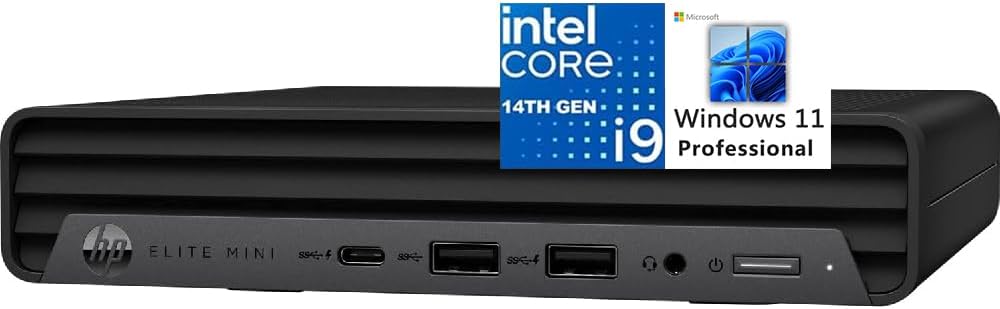
The HP Elite Mini 800 G9 is designed for corporate environments with Windows 11 Pro pre installed for better management tools. It comes with a full keyboard and mouse kit ensuring immediate setup out of the box.
We may earn a commission when you buy through this link, at no additional cost to you.
Its ultra quiet design makes it suitable for offices where noise levels must be kept low for focus and productivity. The brand reputation ensures robust build quality and reliable long term performance.
With triple 4K display support it offers ample visual real estate for multitasking and professional workflows. The inclusion of essential peripherals adds significant value and convenience for enterprise deployment.
Business buyers looking for a hassle free reliable solution will find this model ideal. It removes the friction of setup and configuration for immediate professional use in any office.
Includes a full sized keyboard and mouse so users can start working immediately without purchasing separate peripherals for a desk setup.
Windows 11 Pro includes advanced security and management features that are essential for corporate IT deployments and data protection.
We may earn a commission when you buy through this link, at no additional cost to you.
Selecting the right mini PC requires balancing raw power with specific workflow needs. This guide breaks down the critical factors to ensure you choose a device that matches your technical requirements.
The processor is the heart of your mini PC and the Core i9 series offers the highest performance in the consumer line. Look for models with Hybrid Architecture that combine Performance cores for heavy tasks and Efficiency cores for background tasks. This ensures that your system stays responsive even during demanding workloads like video rendering or 3D modeling.
Prioritize processors with high boost clocks and multiple cores to ensure smooth multitasking. Checking the specific generation is also vital as newer models offer better power efficiency and support for faster memory standards.
RAM determines how many applications you can run simultaneously without slowdowns. For a Core i9 system aim for at least 32GB to handle professional tasks comfortably. DDR5 memory is preferred for newer models due to its higher bandwidth and energy efficiency compared to DDR4.
Storage speed impacts boot times and file transfer rates. Ensure the drive uses PCIe 4.0 technology for maximum speed. Also check for multiple M.2 slots that allow you to expand storage capacity as your data needs grow over time.
Mini PCs face thermal challenges due to their small size so an effective cooling system is non-negotiable. Look for models with dual fans or copper heat pipes that manage heat effectively during long work sessions. A system that throttles due to heat will waste the processor potential.
Noise levels are equally important for shared offices or quiet study spaces. Check for reviews mentioning silent operation or low decibel ratings. Good cooling design ensures the unit stays quiet even when under heavy load.
Modern workflows demand versatile connectivity so check the available ports carefully. USB 3.2 or USB-C ports are essential for fast peripherals. HDMI and DisplayPort outputs determine how many monitors you can connect for productivity setups.
Network speeds matter for large data transfers. Models with 2.5G LAN or even 10G SFP+ ports offer significant advantages over standard Gigabit Ethernet. Wi-Fi 6E or Wi-Fi 7 ensures wireless stability for streaming and cloud work.
Not all mini PCs allow you to upgrade components later. Check if the model has accessible slots for RAM and storage. Some specialized workstation models even offer PCIe slots for graphics cards which is a rare and valuable feature.
Tool-free access panels simplify upgrades and repairs. If you plan to keep the unit for years selecting a model with expansion options protects your investment against future software demands and hardware obsolescence.
Decide if you need Windows or Linux support based on your software ecosystem. Business users often benefit from Windows 11 Pro for security and management tools. Ensure the unit comes with a license if you do not want to buy one separately.
Warranty terms reflect manufacturer confidence in build quality. Aim for at least a one year guarantee but three year warranties are better for critical work machines. Reliable support ensures you can fix issues without costly downtime.
Space saving is a primary reason for choosing a mini PC. Verify the dimensions to ensure it fits your desired spot on a desk or shelf. A compact unit helps keep the workspace organized and professional.
Many models include VESA mounts to attach the PC directly to the back of a monitor. This creates a clean setup where the computer is virtually invisible maximizing desk space for other tools and essentials.
Performance varies significantly across models so compare the price against the included hardware. A higher price tag should mean better components or better build quality. Budget models may compromise on cooling or memory speed.
Consider the total cost of ownership including potential upgrades. A mid-range model that allows for cheap RAM and storage upgrades might be more cost effective in the long run than a fixed spec premium unit.
Ensure proper ventilation by placing the device in an open area away from walls. This prevents heat buildup and keeps performance consistent during heavy use. Avoid stacking items on top of the unit as this blocks airflow vents.
Use high quality power supplies and surge protectors to safeguard internal electronics. Sudden power outages can corrupt data or damage hardware components. Using a dedicated surge protector ensures stable voltage delivery.
Keep the exterior clean by using a soft microfiber cloth to wipe dust regularly. Dust buildup inside vents can lead to overheating and fan noise. Periodic cleaning of the air intakes helps maintain optimal cooling efficiency.
Yes but performance depends on the specific graphics capabilities of the model. Integrated graphics can handle esports titles well but AAA games require models with discrete GPU slots. Check for PCIe expansion options if gaming is a priority.
It is sufficient for most multitasking tasks but DDR5 offers faster speeds. If your workflow involves heavy data movement DDR5 is preferred. However many Core i9 models perform excellently with 32GB of DDR4 RAM.
Most modern models support dual or triple displays through HDMI and USB-C ports. High end workstation units may support up to four screens. Check specific port types to ensure compatibility with your monitor resolution.
Yes models with Ethernet redundancy and expansion slots work well as home servers. Look for support for RAID storage and remote management features. Workstation versions are specifically designed for reliable 24/7 operation.
Most models have accessible RAM slots allowing for future upgrades. Check the manual for maximum supported capacity before purchasing. Some compact units have soldered RAM so verify this before buying.
With proper care and ventilation these units often last five to seven years. Thermal management is key to longevity. Replacing thermal paste periodically can extend the effective life of the processor.
The ten models reviewed here offer a wide range of options for professionals and enthusiasts alike. From the powerful MINISFORUM M1-1390 to the AI focused GEEKOM IT13 MAX there is a solution for every specific need.
Prioritize what matters most to you such as expansion options cooling efficiency or network speed. The best choice balances these features with your budget to deliver a smooth daily computing experience.
Remember that prices and stock levels change frequently so always check the latest details before purchasing. This guide provides a solid foundation for making an informed decision that fits your workspace.