
Polymaker Polydryer
4.4Editor score
Built-in hygrometer
Silicone sealed enclosure
No active heating required
Fits most filament types
Simple storage design
Discover the top filament dryer box models for 2026. We compare drying speed, capacity, and sealing to help you choose the best storage solution.
Choosing the right filament dryer box is essential for high-quality 3D prints. Moisture absorption can ruin prints, causing stringing and clogs. A good dryer actively removes humidity from filaments before and during printing to ensure consistent results.
We evaluated ten top-rated drying boxes based on heating technology, capacity, sealing quality, and user interface. Each product was analyzed for its ability to handle common and engineering filaments while maintaining ease of use and reliability in daily printing workflows.
Each pick includes key specifications and user feedback to help you decide. Prices and availability can change quickly, so always check current listings before purchasing. Our guide helps you find the perfect balance of performance and value for your setup.
4.4Editor score

4.6Editor score

4.5Editor score
This comparison table provides a quick overview of the key specifications for each of the top ten filament dryer box models available in the market. Use this data to narrow down your choices based on capacity, heating power, and special features before reading the detailed reviews.



The Creality Space Pi X4 stands out as the premier choice for serious 3D printing enthusiasts who need reliable and efficient filament drying. With a high rating from users, it combines storage and active drying in a single robust unit that handles up to four spools simultaneously.
We may earn a commission when you buy through this link, at no additional cost to you.
Its dual independent heating chambers allow you to dry different types of filament at their optimal temperatures at the same time. The 200W power in each chamber ensures rapid heat-up, drying filaments up to 30% faster than single-chamber competitors while maintaining precise temperature control.
The trade-off is the higher cost and physical footprint compared to smaller units, but for those printing multiple materials daily, the time saved is significant. The active humidity monitoring and sealing prevent re-absorption during printing pauses, ensuring consistent print quality over long jobs.
This dryer is best for users who need high capacity and advanced features like dual temperature control. It protects your filament investment effectively and streamlines the workflow for professional or hobbyist setups requiring constant access to dry, print-ready materials.
The independent heaters allow simultaneous drying of different materials at their ideal temperatures without cross-contamination or wasted time switching settings manually between batches.
With temperatures reaching up to 85°C, this unit can effectively dry high-performance materials like PA, PC, and ASA that require higher heat to remove moisture properly.
We may earn a commission when you buy through this link, at no additional cost to you.
The SUNLU S1 Plus offers a great balance of performance and affordability for those entering the world of filament drying. Its upgraded design includes a fan that helps circulate air more effectively, removing excess moisture faster than passive heating units.
We may earn a commission when you buy through this link, at no additional cost to you.
The 2-inch LCD screen provides clear visibility of temperature, time, and humidity levels, making it easy to set personalized settings for different filaments. Users appreciate the adjustable range from 35°C to 55°C which covers most common materials like PLA, PETG, and ABS.
While it only holds one spool at a time and lacks the high-temperature capability of premium models, it delivers reliable results for typical daily printing needs. The compact design fits easily into most workspaces without consuming excessive desk real.
This dryer is ideal for hobbyists who want to eliminate stringing and clogs without a major investment. It effectively revives damp filament and maintains dryness during printing, ensuring smoother surfaces and better layer adhesion for your projects.
The built-in fan design speeds up the discharge of excess water from filaments, reducing the drying time needed before you can start printing your next model.
The display screen lets you monitor conditions in real time so you can adjust settings instantly to suit the specific needs of your current filament roll.
We may earn a commission when you buy through this link, at no additional cost to you.
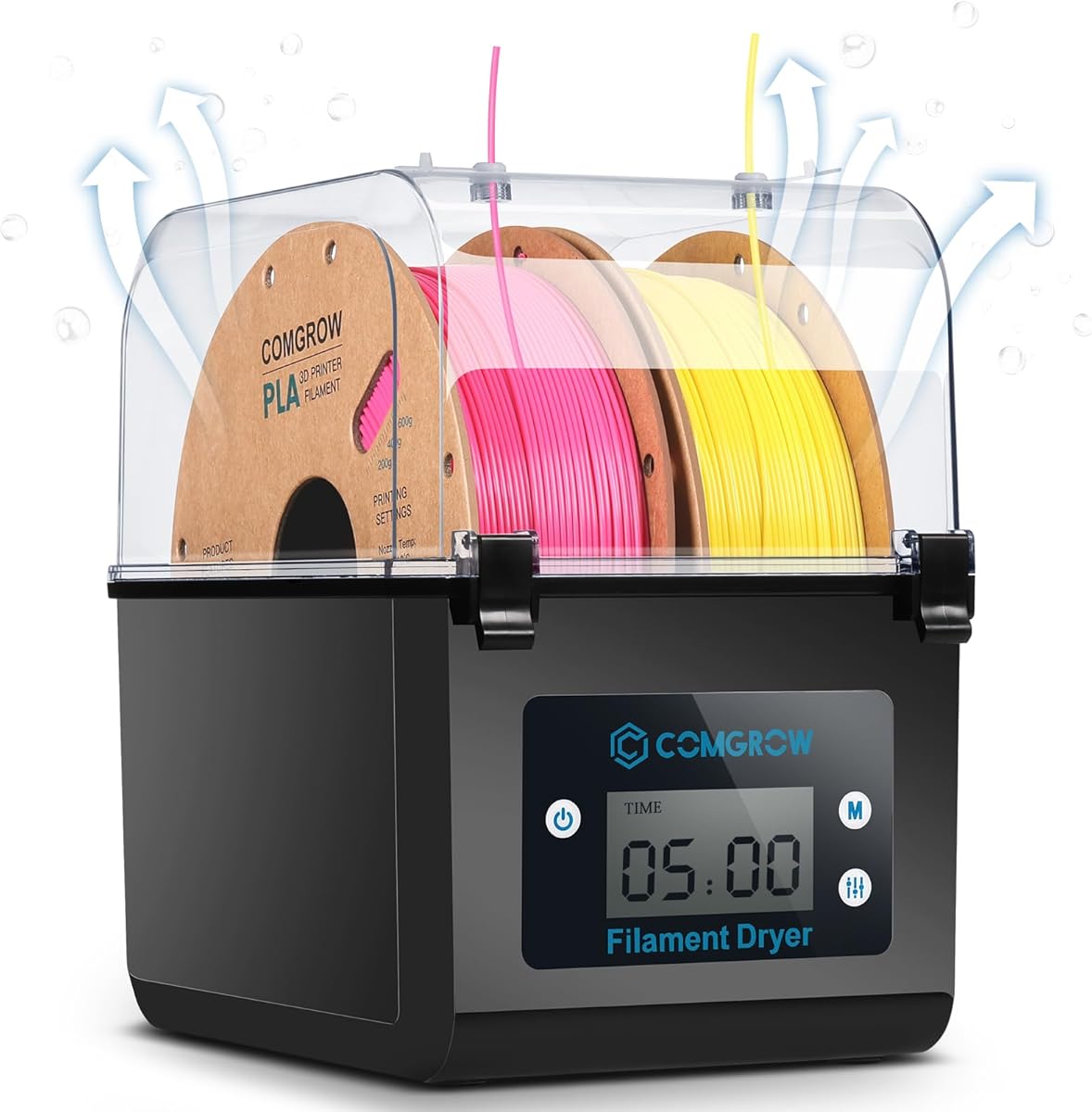
The Comgrow SH01 is a practical solution for users who want to keep multiple spools dry simultaneously without spending too much. It features a generous storage volume that can hold two rolls of 1kg spools, making it suitable for short multi-material projects.
We may earn a commission when you buy through this link, at no additional cost to you.
Its internal heating system removes moisture effectively while keeping the filament dry during printing. The silicone cable sheath at the outlet ensures a smooth path for the filament, reducing the risk of clogging or tangling as it feeds into the printer.
Users should note that the maximum temperature is limited to 50°C, which is sufficient for PLA and PETG but not for high-temperature engineering filaments. The touch interface makes setting temperature and duration straightforward, even for those new to drying technology.
This box is best for casual printers who need consistent quality for everyday prints. It provides reliable protection against humidity, improving layer adhesion and surface finish while offering a user-friendly interface that requires minimal setup time.
Storing two spools at once means you can switch materials quickly without worrying about one filament getting wet while the other is in use or stored separately.
The silicone sheath maintains a tight seal around the filament path, preventing humid air from entering the box while allowing smooth movement for consistent feeding.
We may earn a commission when you buy through this link, at no additional cost to you.
The Polymaker Polydryer takes a different approach by focusing on storage and humidity monitoring rather than active heating. It provides an airtight enclosure that, combined with desiccant, effectively locks out moisture to protect filament between uses.
We may earn a commission when you buy through this link, at no additional cost to you.
A built-in hygrometer lets you see the humidity levels inside the box at a glance, removing guesswork and helping you decide when to replace desiccant. This feature makes it easy to maintain a dry environment without complex controls or settings.
While it cannot actively dry wet filament like powered units, it excels at keeping already dry filament ready for use. It is ideal for printers who mostly dry their filament separately and just need a reliable, sealed environment for storage and feeding during prints.
This box is perfect for those who want a hassle-free solution to prevent moisture re-absorption. It simplifies your workflow by combining storage with moisture control, ensuring your filament stays in a better printing state with minimal effort.
The sealed design works with desiccant to create a barrier against humid air, keeping filament dry and ready for consistent prints without needing electricity.
The visible hygrometer allows you to monitor storage conditions easily, helping you maintain the right environment without constantly opening the box to check.
We may earn a commission when you buy through this link, at no additional cost to you.
The SUNLU S2 is designed for those who need to accommodate larger spools or simply prefer a roomier drying chamber. Its generous capacity allows for 265x274x118mm of space, making it versatile for different filament sizes and brands.
We may earn a commission when you buy through this link, at no additional cost to you.
The built-in spindle ensures that filament spins continuously during the drying process, promoting even heat distribution and faster moisture removal. This feature improves drying efficiency compared to static holders where some sections may heat unevenly.
Users can customize drying times from 0 to 99 hours and temperatures up to 70°C, giving flexibility for various materials. The translucent lid adds convenience by letting you check on the filament without opening the unit and interrupting the process.
This dryer is best for users with larger spools or who need to dry multiple filaments over time. It balances cost and functionality well, offering a robust solution for maintaining filament quality in humid environments without complex setup requirements.
The spindle feature ensures the filament rotates constantly during heating, which helps distribute warmth evenly across the entire spool for thorough drying.
The translucent lid allows you to visually inspect the filament and confirm it is dry without breaking the seal or waiting for the timer to finish.
We may earn a commission when you buy through this link, at no additional cost to you.
The Comgrow SH02 simplifies the drying process with one-key temperature settings for nine different filament types. This feature eliminates the need to manually calculate temperatures, making it easy for beginners to dry PLA, TPU, PETG, and others correctly.
We may earn a commission when you buy through this link, at no additional cost to you.
A 150W PTC heater warms up quickly, reaching 70°C in about 25 minutes, and a built-in fan circulates hot air 360 degrees to ensure uniform drying across both spools. The safety alarm alerts you if the fan stops, protecting the unit from overheating.
The multiple sealing rings ensure that the drying environment remains contained and moisture-free. While it lacks a humidity monitor, its reliable heating and easy operation make it a solid choice for those who want efficiency without complex customization steps.
This dryer is best for casual users who print common filaments regularly. The preset options save time and reduce guesswork, while the safety features provide peace of mind that your machine will not burn out unexpectedly during drying cycles.
The preset buttons allow you to start drying with a single tap, selecting the optimal temperature and time for the specific filament type you are using.
The 360 degree circulating hot air ensures every part of the spool gets heated evenly, reducing drying time and improving consistency across the filament.
We may earn a commission when you buy through this link, at no additional cost to you.
The Creality Space Pi Base is a compact yet powerful dryer that features a large 3.7-inch touch screen for easy operation. Its user-friendly interface makes it simple to track drying conditions and switch between Celsius and Fahrenheit units as needed.
We may earn a commission when you buy through this link, at no additional cost to you.
The power-off memory function is a standout feature that saves your previous material and temperature settings after a power outage. This ensures you do not have to reset parameters manually, saving time and ensuring consistency in your drying workflow.
With 12 filament presets, it covers a wide range of materials from PLA to high-performance composites like PLA-CF and PA-CF. The 110W PTC heater circulates 360 degree hot air to dry moisture effectively while maintaining energy efficiency and eco-friendliness.
This unit is best for users with limited desk space who still want advanced features. It balances functionality and compact design well, offering reliable performance for standard and composite filaments with minimal setup complexity and intuitive controls.
The memory function keeps your settings intact even after a power loss, allowing you to resume drying exactly where you left off without reprogramming.
Supporting 12 different filament types including composites makes this dryer versatile for various projects without needing to buy multiple units.
We may earn a commission when you buy through this link, at no additional cost to you.
The Creality Space Pi Plus builds on the base model by adding humidity monitoring and dual spool capacity. This allows users to see real-time moisture levels and dry two filaments at once, increasing efficiency for those who print with multiple materials.
We may earn a commission when you buy through this link, at no additional cost to you.
It retains the large touch screen and power-off memory features for ease of use. The 12 filament presets and adjustable temperature range from 45°C to 70°C cover most common needs, making it straightforward to use for daily printing tasks.
While it does not reach the high temperatures of premium models for engineering filaments, it is highly effective for PLA, PETG, ABS, and TPU. The sealed design keeps moisture out, ensuring filament stays dry during printing pauses and storage periods.
This dryer is best for users who need more capacity and monitoring features without upgrading to the most expensive tier. It offers a well-rounded solution for consistent printing, blending practical dual spool support with smart digital controls and monitoring.
Drying two spools simultaneously doubles your efficiency when switching materials, allowing you to keep one dry while printing another without delay.
The humidity sensor gives you immediate feedback on the internal environment, helping you confirm filament is truly dry before starting a new print.
We may earn a commission when you buy through this link, at no additional cost to you.
The Creality Space Pi X4L is designed for high-volume users who need to dry and store up to four spools at once. With dual independent 200W heating chambers, it removes moisture rapidly, reducing drying time significantly compared to single-chamber models.
We may earn a commission when you buy through this link, at no additional cost to you.
Its capacity and power make it ideal for professional environments where downtime must be minimized. The advanced touch UI allows precise control, ensuring that engineering filaments can be dried effectively while maintaining optimal conditions for standard filaments simultaneously.
While the size and price are higher, the benefits in speed and volume justify the investment for serious users. The sealed enclosure and humidity monitoring protect filament even when not in use, extending shelf life and reducing waste over time.
This dryer is best for studios or frequent print users who demand efficiency and reliability. It delivers high-performance drying with a user-friendly interface, ensuring your filament remains ready for top-quality prints day after day without interruption.
The powerful heaters and dual chambers dry filaments much faster than standard units, helping you get back to printing sooner after moisture removal.
Holding four spools means you can keep a full palette of materials ready to print, supporting complex projects that require multiple color or material changes.
We may earn a commission when you buy through this link, at no additional cost to you.
The Official Creality Space Pi DB05 is engineered for setups with multiple printers, offering eight filament holes and PTFE tubing to feed four machines simultaneously. This multi-printer compatibility makes it a standout for shared workspaces or production environments.
We may earn a commission when you buy through this link, at no additional cost to you.
With dual independent heating chambers, you can dry two types of filament at different temperatures at the same time, maximizing efficiency. The 85°C max temperature ensures engineering filaments like PA and PC are dried thoroughly, preventing print defects from moisture.
Energy saving modes allow single-chamber operation to reduce power consumption when only one type of filament is needed. However, note that you should use compatible heat-resistant trays for best results, as other brands may not withstand the heat levels.
This dryer is best for advanced users managing multiple printers who need speed and versatility. It combines high-capacity design with energy-efficient features, delivering reliable performance for high-demand printing setups without compromising on temperature precision or drying speed.
Designed to feed up to four printers at once, this unit reduces bottlenecks by keeping multiple spools dry and ready for simultaneous print jobs.
The two chambers let you set different temperatures, enabling you to dry different materials like ABS and PLA side by side without waiting.
We may earn a commission when you buy through this link, at no additional cost to you.
Selecting the right filament dryer depends on your printing volume, filament types, and workspace constraints. Understanding the key features will help you invest in a model that truly meets your needs.
Capacity is a primary consideration, especially if you print often or use multiple materials. Single spool dryers like the SUNLU S1 Plus are compact and sufficient for hobbyists. For higher throughput, consider models with two or four spools such as the Creality Space Pi X4 or Comgrow SH02. This reduces downtime by ensuring you always have dry filament ready for the next print.
Choose a unit that fits your workflow. If you frequently switch between PLA and PETG, a dual spool option allows you to keep both dry simultaneously.
Different filaments require different drying temperatures. Standard PLA and PETG dry well at 45 to 60 degrees Celsius. Engineering filaments like ABS, ASA, PC, and PA need higher temperatures, up to 85 degrees Celsius, to remove moisture effectively. Check that the dryer's maximum temperature meets the needs of all the materials you plan to use.
Ensure the unit supports the full range you need. Lower temperature units may not be sufficient for specialty filaments.
PTC heaters are generally more efficient and safer than older heating pads. Dual chambers or fans that circulate air, such as 360 degree hot air systems, ensure even drying and faster moisture removal. These features reduce wait times and improve the consistency of the drying process.
Look for units that explicitly mention air circulation or dual heating for faster and more uniform results.
A good dryer must seal tightly to prevent moisture from re-entering during and after drying. Look for silicone rings, snap buttons, or cable sheaths that maintain a dry environment. Some models include active humidity monitoring to help you confirm the environment stays dry over time.
Effective sealing is critical for preventing filament reabsorption between prints.
Ease of use varies between models. Touch screens and preset buttons for different filaments simplify operation. Features like power-off memory save your settings after a power outage, while real-time displays let you monitor conditions without opening the unit.
A clear interface helps you set the right parameters quickly and avoid errors.
Consider the physical dimensions of the dryer and your available workspace. Larger units with four spools offer more capacity but require more desk space. Compact models are easier to fit on small workbenches but may limit capacity or temperature options.
Measure your workspace before purchasing to ensure the unit fits comfortably alongside your printer and other tools.
Safety is important when heating filaments for extended periods. Look for features like overheat protection, automatic shut-offs, and fan failure alarms. These mechanisms prevent damage to the unit and your filament if something goes wrong during a long drying cycle.
Prioritize units that include multiple safety layers for peace of mind during unattended drying.
Prices vary widely from passive storage boxes to advanced dual-chamber dryers. Determine how critical active drying is for your results. If you mainly need storage, a passive model with a hygrometer may suffice. For consistent high-quality printing, investing in an active dryer with presets and fans offers better long-term value.
Balance cost against the features you truly need to avoid overspending on unnecessary complexity.
To begin using your filament dryer, place the filament spool inside the chamber and thread the filament through the outlet hole. Ensure any sealing rings are properly seated and the lid is closed tightly to maintain the dry environment. If your model includes desiccant, make sure it is fresh and properly placed to absorb moisture.
Set the temperature and time according to your filament type. Most units have presets for common materials, but if manual control is available, refer to the manufacturer's recommended settings. Start the drying process and let it run until completed. Do not open the unit while heating to prevent humidity from entering.
After drying, keep the filament sealed in the box until ready to use to prevent reabsorption. Clean the chamber occasionally to remove dust or debris, and check sealing rings for wear. If the model includes a fan or heating element, inspect for blockages or damage during regular maintenance to ensure continued performance.
Signs of wet filament include popping or crackling sounds during printing, poor layer adhesion, surface roughness, and excessive stringing or blobs. If you notice these issues, drying the filament should improve print quality significantly. Testing a small section can confirm if moisture is the cause.
Drying time depends on the filament type, moisture level, and dryer efficiency. Typically, it takes 4 to 8 hours for standard filaments, but highly moisture-absorbent materials like Nylon may need up to 24 hours. Some modern units with powerful heaters can reduce this time significantly.
Yes, most filament dryer boxes are designed to function as both dryers and storage units. Models with sealing and humidity monitoring are especially effective for keeping filament dry over the long term between prints. Some units even allow you to print directly from the box without removing the spool.
For PLA, a temperature of 45 to 50 degrees Celsius is typically sufficient to remove moisture without degrading the material. Always refer to the filament manufacturer's specific recommendations to avoid overheating, which can cause brittleness or deformation.
If your dryer uses desiccant packets, they should be replaced periodically or once they change color, indicating they are saturated. Regular replacement ensures the box maintains a dry environment. Some models use active heating or sealing instead of desiccant, reducing maintenance needs.
If filament becomes wet again quickly, your dryer may not be sealing properly. Check for worn seals or loose lids and ensure the outlet hole is closed when not printing. Storage in a dry place or use a dedicated moisture-proof container after drying to maintain results.
This depends on the dryer model. Single-chamber units typically dry one type at a time to avoid temperature conflicts. Dual-chamber models allow you to dry different filaments simultaneously at their optimal temperatures, which is efficient for multi-material workflows.
No, using too high a temperature can damage certain filaments like PLA or TPU, causing them to become brittle or melt slightly. Always follow recommended temperature ranges for each filament type to ensure safe and effective drying without compromising material quality.
Choosing the right filament dryer box depends on your specific printing needs, budget, and workspace. From affordable single-spooled options like the Comgrow SH02 to premium high-capacity models like the Creality Space Pi X4, each product offers unique benefits tailored to different users.
Prioritize features that matter most to you, such as spool capacity, temperature range, and ease of use. Active drying with sealed environments ensures consistent print quality and reduces waste from moisture-related issues, making it a valuable addition to any serious 3D printing setup.
Prices and availability can change frequently, so always check the current listings and user reviews before making a purchase. Our guide provides a solid starting point, but verifying the latest information ensures you select the best fit for your current printing projects and goals.