
Redragon K618 PRO Wireless
4.1Editor score
Tri-mode wireless connectivity
Macro and media controls
Slim low-profile design
This guide compares the top low profile mechanical keyboards for typing and gaming, evaluating switches, build quality, connectivity options, and ergonomic
Low profile mechanical keyboards offer a unique blend of tactile feedback and slim design, making them ideal for users who value speed and comfort. These keyboards reduce finger travel distance while maintaining the satisfying click of mechanical switches, perfect for long typing sessions or rapid gaming inputs.
We compared ten leading models based on switch type, connectivity options, build materials, and user ratings to find the best options available. Our analysis focuses on real-world performance, durability, and features like programmability and backlighting that enhance daily usability across different workloads.
Each pick highlights specific strengths like wireless stability or custom firmware support to guide your decision. Prices and availability change frequently, so check the current listings before purchasing to ensure you get the latest deal on these versatile typing tools.
4.1Editor score

4.3Editor score

4.7Editor score
Below is a side-by-side comparison of all ten models to help you quickly identify which features matter most for your specific needs and budget constraints.



The Redragon K618 PRO Wireless stands out as an affordable entry into low profile mechanical keyboards with strong wireless capabilities. It holds a solid 4.1 rating from users who appreciate its ability to switch seamlessly between devices without lag or pairing delays.
We may earn a commission when you buy through this link, at no additional cost to you.
Its standout feature is the dedicated macro zone that allows up to 20 on-the-fly macro keys without needing software installation. This makes it ideal for gamers or professionals who need quick access to complex commands. The tri-mode connectivity ensures you can connect via USB-C, Bluetooth, or 2.4GHz wireless instantly.
While the plastic construction lacks the premium feel of aluminum models, the 30% slimmer profile significantly reduces wrist strain during long typing sessions. The stock Red switches provide linear feedback that feels smooth, though enthusiasts might prefer more tactile options available on higher-end models.
This keyboard is perfect for budget-conscious users who need reliable wireless performance and customization without breaking the bank. If you prioritize functionality over premium materials, the K618 PRO offers exceptional value for its price range.
You can record custom key combinations directly on the keyboard using the dedicated macro zone, allowing for instant access to shortcuts without installing any driver software.
Switch between your PC, laptop, and tablet effortlessly using the tri-mode system, which supports Bluetooth, 2.4GHz wireless, and wired USB-C connections for stable performance.
We may earn a commission when you buy through this link, at no additional cost to you.
The Keychron K3 Version 2 QMK is a compact 75% wireless mechanical keyboard designed for productivity and a tactile typing experience. It receives a 4.3 rating for its seamless multitasking capabilities and robust build quality using reinforced aluminum.
We may earn a commission when you buy through this link, at no additional cost to you.
Its primary strength lies in the open-source QMK firmware, which offers endless possibilities for key remapping, macros, and shortcuts. The Keychron Launcher web app simplifies customization even further with an AI assistant that helps you configure settings using plain language.
The unique Mac layout ensures all necessary multimedia keys are included while remaining compatible with Windows through extra keycaps. However, the lack of hot-swap support means you cannot easily change switches later if you decide to upgrade your tactile experience.
This keyboard is ideal for users who value open-source customization and need a reliable wireless keyboard for multiple devices. It strikes a great balance between portability, build quality, and advanced features that power users appreciate.
The QMK firmware allows you to remap every key, create complex macros, and adjust layers, giving you complete control over how your keyboard functions for work or gaming.
Included extra keycaps for both Windows and Mac ensure you have the right layout regardless of your operating system, making it a versatile choice for mixed-device setups.
We may earn a commission when you buy through this link, at no additional cost to you.
The Cherry MX 10.0N RGB combines style and functionality with an ultra-thin profile of just 0.87 inches and premium aluminum housing. It holds a 4.3 rating for its responsive performance and sturdy construction suitable for both gaming and work environments.
We may earn a commission when you buy through this link, at no additional cost to you.
Its standout feature is the use of Cherry MX Low Profile Speed switches, which are linear, quiet, and responsive for smooth typing and gaming. These switches are designed for faster actuation, making them ideal for rapid inputs where every millisecond counts.
While the integrated stand offers ergonomic typing positions, the price reflects the premium build quality and proprietary switches. Users might find the linear speed switches less satisfying for long typing sessions compared to tactile alternatives available in the market.
This model is perfect for gamers and professionals who want a sleek, durable keyboard with high-performance switches. The aluminum build ensures longevity, while the RGB backlighting adds a personalized touch to your setup.
The sturdy aluminum housing provides a sleek look and superior durability, ensuring the keyboard remains stable during intense gaming sessions or heavy daily typing workloads.
Cherry MX Low Profile Speed switches offer shorter actuation points for quicker responses, enhancing your gaming performance by reducing the delay between key press and output.
We may earn a commission when you buy through this link, at no additional cost to you.
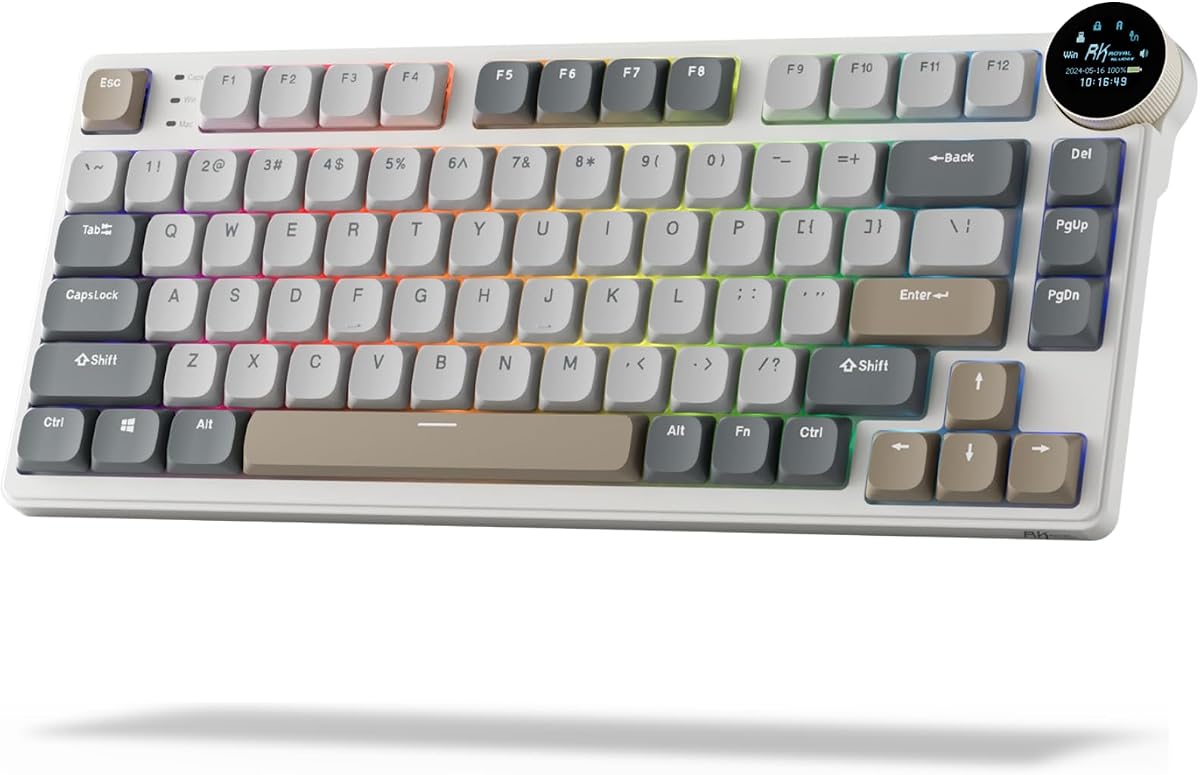
The RK ROYAL KLUDGE N80 redefines versatility with a smart display screen that showcases custom GIFs, dates, and connection modes. It holds a 4.1 rating for its intuitive knob control and heavy-duty base that solves wobbling issues common in low-profile keyboards.
We may earn a commission when you buy through this link, at no additional cost to you.
Its unique screen and knob combination allows effortless control of volume, brightness, and connection modes with a simple twist or click. The tri-mode connectivity ensures seamless connections via Bluetooth, 2.4GHz wireless, or USB-C wired mode for limitless setup options.
The triple sound-absorbing layer minimizes hollow sounds and cavities noise, delivering a super smooth and quiet typing experience. However, the added components increase the overall weight, which might not suit users who prioritize extreme portability over features.
This keyboard is ideal for tech enthusiasts who want a personalized setup with visual feedback and sound dampening. The top-mounted design provides stability, making it a strong choice for both gaming and office work.
The dynamic display shows connection modes and battery status, offering a visual way to monitor your keyboard's state without needing to check your device screen.
Dual-layer sound-absorbing foams and a silicone bottom pad reduce hollow noise, ensuring your typing sounds crisp and professional even during long work hours.
We may earn a commission when you buy through this link, at no additional cost to you.
The Flow Lite 84 Keys is a 75% wireless mechanical keyboard designed for natural wrist positioning and long typing comfort. It holds a 4.3 rating for its effortless precision and reduced finger joint fatigue during extended use.
We may earn a commission when you buy through this link, at no additional cost to you.
Its standout feature is the Specter Full POM linear switches with lower operating force to soften the touch. The gasket mount design brings a soft and cushioned feel, enriching each keystroke with a richer, more satisfying tone.
While the ABS body material is lighter than aluminum, it still offers a textured surface to maintain a soothing touch. The built-in adjustable kickstand ensures ergonomic angles, though some users may prefer the rigidity of metal frames for stability.
This keyboard is perfect for writers and office workers who prioritize comfort and portability. The long battery life ensures you stay productive without frequent recharging, making it a reliable travel companion.
The design lowers the front height and key travel distance, allowing for a more natural wrist position that reduces strain during extended typing sessions.
The gasket mount system adds flexibility and sound dampening, ensuring each keystroke feels soft and produces a premium acoustic profile.
We may earn a commission when you buy through this link, at no additional cost to you.
The Keychron K1 Ultra 8K is a high-performance low-profile wireless keyboard with an 80% TKL layout and support for 8K wired polling. It holds a 4.7 rating for its tri-mode connectivity and robust build quality.
We may earn a commission when you buy through this link, at no additional cost to you.
Its standout feature is the support for 8K polling rates, delivering ultra-fast responsiveness for competitive gaming and high-performance devices. The hot-swappable low-profile POM switches allow you to replace switches without soldering, offering extensive customization options.
The open-source ZMK firmware combined with an AI-assisted customization app allows deep personalization of your typing experience. However, this level of control may overwhelm casual users who prefer a simple plug-and-play setup.
This keyboard is ideal for advanced users who demand speed and flexibility. The durable hardwood side panels and sound-dampening layers provide a premium feel and quiet operation.
With 8K polling support, your inputs are processed faster than ever, ensuring minimal latency for competitive gaming and precise cursor control.
Swap out low-profile POM switches easily to change tactile feedback without soldering, allowing you to tailor the keyboard to your unique preference.
We may earn a commission when you buy through this link, at no additional cost to you.
The Keychron K17 Max offers a popular 96% layout in a low-profile wireless mechanical keyboard designed for enhanced productivity. It holds a 4.4 rating for its QMK firmware support and high-performance wireless gaming capabilities.
We may earn a commission when you buy through this link, at no additional cost to you.
Its unique double-shot PBT keycaps are durable and oil-resistant, ensuring a premium typing experience over long-term use. The QMK open-source firmware ensures transparency and security, while the Keychron Launcher app allows regular updates and feature access.
The aluminum frame and ultra-slim profile make it one of the thinnest wireless mechanical keyboards on the market. However, the reliance on open-source tools may require technical knowledge to fully utilize customization features effectively.
This keyboard is perfect for users who want a compact layout without sacrificing n keys. Its wireless performance and slim design make it ideal for multitasking across multiple devices.
This layout retains commonly used keys while saving desk space, giving you a full-functionality keyboard in a more portable form factor.
A fast 1000 Hz polling rate ensures that your wireless connection keeps up with your fastest inputs during intense gaming sessions.
We may earn a commission when you buy through this link, at no additional cost to you.
The Flow Lite 100 Keys provides a full-size layout with low-profile mechanical switches designed for effortless precision. It holds a 4.4 rating for its natural wrist position and long-term typing comfort.
We may earn a commission when you buy through this link, at no additional cost to you.
Its standout feature is the 1000Hz polling rate that ensures responsive performance wirelessly, perfect for high-performance devices. The gasket mount design accommodates different switch forces, allowing you to match your unique typing style for a soft experience.
The 3000mAh battery provides up to 100 hours of working time, ensuring you stay productive without frequent recharges. However, the larger size may not fit smaller desks, and the ABS material is lighter than premium aluminum options.
This keyboard is ideal for users who need a full numeric keypad without sacrificing ergonomic comfort. The flexible connectivity options make it a versatile choice for both Windows and Mac environments.
A 3000mAh lithium battery ensures up to 100 hours of usage on a single charge, letting you focus on work without worrying about power loss.
The gasket mount system and sound-dampening layers soften each keystroke, reducing fatigue and improving sound quality during long typing sessions.
We may earn a commission when you buy through this link, at no additional cost to you.
The Keychron K3 Max SE is a low-profile wireless mechanical keyboard with a 75% layout and enhanced productivity features. It holds a 4.6 rating for its triple connectivity options and ultra-fast responsiveness for competitive gameplay.
We may earn a commission when you buy through this link, at no additional cost to you.
Its standout feature is the advanced EPDM acoustic foam that elevates every keystroke with a quieter, more cushioned typing experience. The hot-swappable support allows you to easily change switches in seconds without soldering, offering flexibility for customization.
The redesigned stabilizers reduce wobble on larger keys like the spacebar and Enter, resulting in a smoother and more stable typing experience. However, the high price point may deter casual users who do not need extensive customization capabilities.
This keyboard is ideal for power users who value acoustic quality and hot-swap flexibility. The Mac layout support ensures seamless integration for Apple ecosystem users.
The use of advanced EPDM acoustic foam dampens noise effectively, ensuring that your typing is quiet and pleasant even in shared office spaces.
Change your switches in seconds using the hot-swap sockets, allowing you to customize tactile feedback without needing soldering tools or skills.
We may earn a commission when you buy through this link, at no additional cost to you.
The Razer Ornata V3 combines the snappy feedback of mechanical switches with the familiar feel of a conventional membrane keyboard. It holds a 4.5 rating for its natural hand positioning and durable UV-coated keycaps.
We may earn a commission when you buy through this link, at no additional cost to you.
Its standout feature is the Mecha-Membrane switches that fuse clicky feedback with familiar feel for satisfying keystrokes. The UV-coated keycaps ensure fade-resistant legends and greater protection against wear and tear from frequent use.
While it is not a full mechanical keyboard, the low-profile keys allow for natural hand positioning with little strain during long hours of use. The magnetic soft touch wrist rest provides ample comfort, though it lacks the programmability of dedicated mechanical models.
This keyboard is perfect for gamers who want a mechanical feel without the height or noise of traditional switches. Its durability and included wrist rest make it an excellent choice for daily gaming sessions.
This unique switch technology blends the tactile snap of mechanical switches with the smooth travel of membranes, offering a balanced experience for gamers and typists.
UV-coated keycaps resist fading and wear, ensuring the keyboard maintains its premium look and feel over years of heavy use.
We may earn a commission when you buy through this link, at no additional cost to you.
Selecting the right low profile mechanical keyboard requires understanding key factors like switch types, layout sizes, and connectivity options to match your workflow.
Low profile switches come in linear, tactile, and clicky varieties. Linear switches offer smooth travel without bumps, while tactile switches provide a physical bump. Clicky switches offer sound feedback for confirmation.
Choose based on your typing style and whether you prioritize speed or feedback.
Layouts range from full-size to compact 75% or even 60% options. A full layout offers a numpad but takes more space, while compact layouts save desk real estate and improve ergonomics.
Select a size that matches your desk dimensions and functional needs.
Consider whether you need wired, Bluetooth, or 2.4GHz wireless connectivity. Wireless keyboards offer flexibility but require charging, while wired options ensure zero latency for competitive gaming.
Multi-device support via Bluetooth is essential for multitasking between phone and computer.
Aluminum housings provide durability and a premium feel but add weight, while plastic frames are lighter and often more affordable. Check for solid stabilizers and keycap quality.
Higher build quality ensures longevity and better typing stability over time.
Look for keyboards with QMK or open-source firmware if you want advanced key remapping and macros. Hot-swappable sockets allow you to change switches without soldering.
These features extend the lifespan and utility of the keyboard for power users.
Low-profile keyboards are designed to reduce wrist strain by lowering the height of the keys. Ensure the keyboard has adjustable stands or supports to fit your posture.
Comfort is critical for preventing repetitive strain injuries during long typing sessions.
RGB backlighting allows personalization but consumes battery life. Choose customizable lighting options that match your workspace style.
Some models offer per-key customization while others have preset modes.
Prices vary significantly based on features like wireless connectivity and hot-swap support. Set a budget that balances essential features with your financial constraints.
Often mid-range models offer the best balance of performance and cost.
Always start by checking the connectivity mode required for your device. For wireless models, charge fully before use and pair via Bluetooth or the 2.4GHz dongle as needed.
Clean your keyboard regularly using compressed air to remove dust between keycaps. Use a soft brush to clean residue and avoid using water or harsh chemicals directly on the switches.
To maximize battery life, reduce RGB brightness when not needed and turn off the keyboard when not in use. Store in a cool, dry place to protect electronic components from humidity.
Low profile mechanical keyboards are designed with shorter key travel and lower switches than standard mechanical keyboards. They combine the tactile feedback of mechanical switches with a slim profile for faster actuation and reduced wrist strain.
They can be better for gaming due to reduced key travel time and lighter actuation force. However, personal preference plays a huge role since some gamers prefer traditional mechanical height for better finger placement.
Yes, most low profile mechanical keyboards support both Mac and Windows operating systems. Many include switchable layouts or extra keycaps to accommodate different OS shortcuts.
Generally, yes, if they use high-quality switches and durable materials. However, due to the tighter internal components and thinner switches, some models might wear faster with heavy daily use than standard height keyboards.
Low profile keyboards tend to be quieter than standard mechanical keyboards because the switches have less travel distance. However, clicky switches will still make noise, while linear switches remain relatively silent.
QMK is an open-source firmware that allows deep customization of keymaps, macros, and layers. It matters because it gives users total control over keyboard functionality beyond stock settings.
Many low profile mechanical keyboards offer specific Mac layouts with function keys and media controls for macOS. Check product descriptions to confirm full compatibility with Apple ecosystems.
Yes, many modern low profile mechanical keyboards support hot-swappable switches. This allows you to replace switches without soldering to customize tactile feedback easily.
In this guide, we highlighted the top ten low profile mechanical keyboards ranging from budget-friendly Redragon models to premium Keychron options. Each model offers unique strengths in customization, build quality, and connectivity options.
When choosing, prioritize features that match your daily workflow such as wireless versatility for multitasking or hot-swappable switches for long-term customization. Ergonomics and build durability should also be primary concerns.
Remember that prices and availability change frequently so always check current listings before purchasing. This ensures you get the best value for your specific typing and gaming needs.