
ASUS Vivobook 15 Laptop
4.5Editor score
Intel Core i9-13900H
32GB RAM and 1TB SSD
Physical Webcam Shield
Finding the right laptop today means balancing power and price. The ASUS Vivobook lineup offers a wide range of options for students, professionals, and casual users. Each model brings unique strengths in speed, screen quality, and battery life.
We analyzed ten popular Vivobook models to see how they handle real-world tasks. Our comparison looks at processors, memory, storage, and display technologies. This list helps you choose based on your specific needs and budget.
Each pick shows key features, pros, and cons to simplify your decision. You will see ratings and detailed specs for every model. Please note that prices and availability can change frequently on Amazon.
4.5Editor score

4.8Editor score

4.3Editor score
As an Amazon Associate we earn from qualifying purchases.
This table provides a side-by-side view of all ten ASUS Vivobook laptops. Compare key specifications like processor type, memory size, storage capacity, and display dimensions to find the best fit for your workflow.


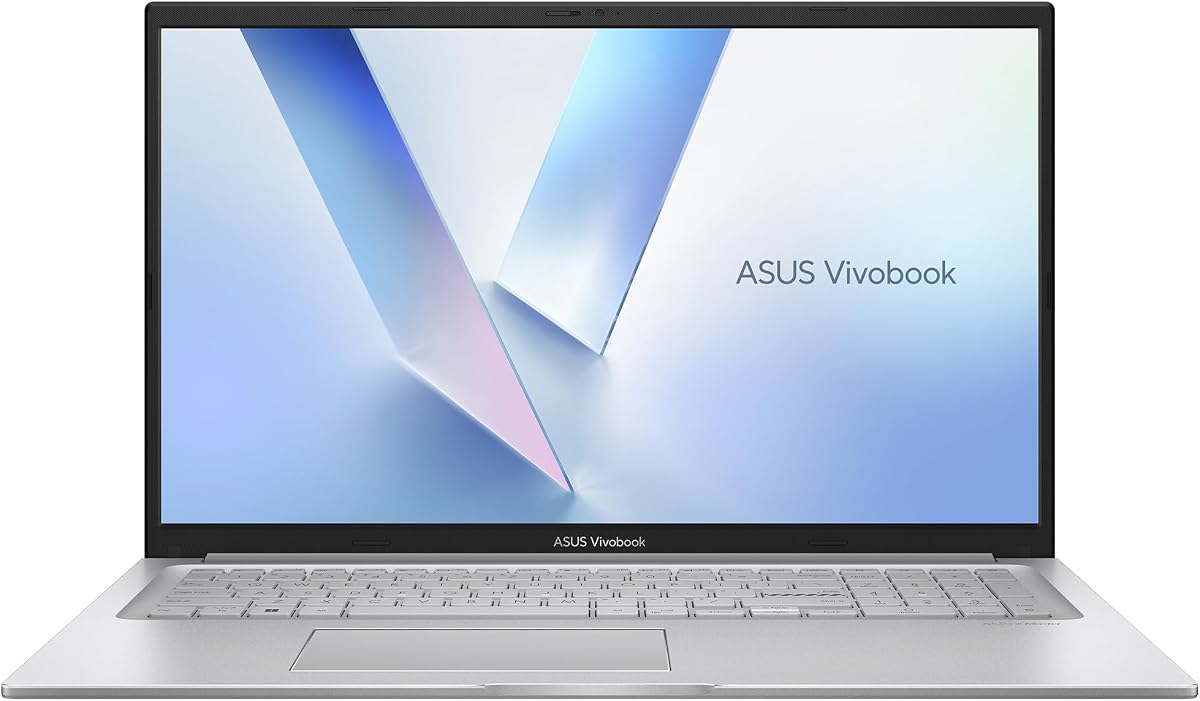




This ASUS Vivobook 15 laptop delivers premium performance for professionals. It ranks high with a 4.5 rating and features a powerful Intel Core i9 processor.
We may earn a commission when you buy through this link, at no additional cost to you.
The 32GB RAM and 1TB SSD provide ample space and speed. It supports next-gen AI workloads and multitasking without slowing down.
Trade-offs include a higher cost and the need for specific cooling. However, the included PCO Cooler helps maintain peak performance during intense tasks.
Buyers seeking elite-level performance for simulations should choose this model. It offers the best balance of power and connectivity in the lineup.
The Intel Core i9 processor is optimized for Next Gen AI workloads. It handles complex simulations efficiently for advanced users.
The exclusive bundle includes a PCO Cooler to prevent thermal throttling. This ensures the processor maintains peak frequency for longer durations.
We may earn a commission when you buy through this link, at no additional cost to you.
The ASUS Vivobook 16 offers a stunning display for creators. It has a 4.4 rating and features a Qualcomm Snapdragon X chipset for efficiency.
We may earn a commission when you buy through this link, at no additional cost to you.
The 16-inch WUXGA screen provides vibrant visuals and smooth refresh rates. It is designed for power efficiency and multi-day battery life.
Trade-offs involve potential app compatibility issues with Qualcomm chips. However, performance for daily tasks is seamless with the Adreno GPU.
This model suits users prioritizing display quality and battery life. It is ideal for streaming and light content creation on the go.
The 16-inch WUXGA display features 1920 x 1200 resolution. It offers 300-nit brightness and brilliant life-like colors for media.
The Snapdragon X processor includes a Hexagon NPU for AI tasks. It delivers up to 45 TOPS for fast communication.
We may earn a commission when you buy through this link, at no additional cost to you.
This ASUS Vivobook 14 laptop stands out with a 4.8 rating. It features a Snapdragon X processor ready for Copilot+ PC experiences.
We may earn a commission when you buy through this link, at no additional cost to you.
Users benefit from efficient computing and smooth multitasking. The 16GB RAM and 512GB SSD provide a solid base for daily work.
Trade-offs include standard storage and potential software constraints. However, the NPU enables unique AI features for enhanced productivity.
Buyers seeking future-ready AI tools should consider this model. It offers excellent value for those wanting advanced features in a slim body.
Pre-installed Windows 11 Home supports Copilot+ PC capabilities. It offers the latest features and enhanced security for users.
The Snapdragon X processor ensures smooth multitasking. With Adreno GPU, it handles visuals and computing efficiently.
We may earn a commission when you buy through this link, at no additional cost to you.
The ASUS Vivobook 17 laptop features a large 17.3 inch display. It has a 4.0 rating and offers reliable performance for everyday life.
We may earn a commission when you buy through this link, at no additional cost to you.
Its NanoEdge display provides bright visuals with eye-care certification. Fast charging allows users to charge quickly to 60% in minutes.
Trade-offs involve a larger footprint for portability. However, the numeric keypad and military-grade durability are excellent for work.
This model suits users needing screen real estate for data entry. It is ideal for home offices or stationary use where size matters less.
The slim-bezel NanoEdge display offers wide viewing angles. It includes TÜV Rheinland eye-care certification to reduce strain.
Fast charging technology allows reaching 60% in 49 minutes. Users can get up and running quicker than ever.
We may earn a commission when you buy through this link, at no additional cost to you.
The ASUS Vivobook Go 15 laptop offers incredible performance for the price. It has a 4.3 rating and is equipped with an AMD Ryzen 5 processor.
We may earn a commission when you buy through this link, at no additional cost to you.
It provides an ultrafast and smooth experience for browsing and media. The fast-charge technology recharges the battery up to 50% in 30 minutes.
Trade-offs include 8GB RAM which limits heavy multitasking. However, IceCool thermal technology keeps the laptop cool in all situations.
Buyers seeking a reliable budget-friendly laptop should choose this model. It balances durability and connectivity well for students and casual users.
Equipped with AMD Ryzen 5 and 512GB SSD. The laptop provides an ultrafast and smooth experience for users.
The ErgoSense keyboard design reduces strain on hands and wrists. It is fine-tuned for comfortable long sessions.
We may earn a commission when you buy through this link, at no additional cost to you.
The ASUS Vivobook Go 15 laptop is a solid budget-friendly choice. It has a 4.3 rating and features an AMD Ryzen 3 processor for essentials.
We may earn a commission when you buy through this link, at no additional cost to you.
The 8GB DDR5 RAM allows multiple apps to run smoothly. Its thin and light design makes it easy to carry everywhere.
Trade-offs involve limited storage space for files and media. However, the military-grade durability ensures reliability for students or casual users.
This model suits those prioritizing cost over storage capacity. It is perfect for basic web browsing and light productivity tasks on a tight budget.
This laptop measures 14.19 by 9.15 by 0.70 inches. Weighing 3.59 lbs, it offers portability for everyday use.
8GB DDR5 memory smoothly runs multiple applications at once. It provides faster performance for productivity tasks.
We may earn a commission when you buy through this link, at no additional cost to you.
This ASUS Vivobook 15 laptop boasts a perfect 5.0 rating. It features an Intel Core i9 processor for elite-level performance.
We may earn a commission when you buy through this link, at no additional cost to you.
PCONLINE customized it with options up to 48GB RAM and 2TB SSD. This ensures speed to boot in seconds and massive storage.
Trade-offs involve an opened original seal for upgrades. However, a 3-year coverage on upgraded parts is provided by PCOnline US.
Buyers seeking high customization should choose this model. It delivers a sophisticated Blue chassis and all the power needed for professionals.
The original seal was opened solely for upgrading purposes. Up to 48GB RAM and 2TB SSD options are available.
A 3-year coverage on upgraded RAM and SSD is provided. Remaining components retain the original manufacturer coverage.
We may earn a commission when you buy through this link, at no additional cost to you.
The ASUS Vivobook 14 laptop offers high speed RAM and storage. It has a 4.1 rating and features a 24GB RAM configuration.
We may earn a commission when you buy through this link, at no additional cost to you.
The 1TB SSD allows for fast bootup and data transfer. It is designed to smoothly run multiple applications at once for users.
Trade-offs include an entry-level i3 processor which limits heavy tasks. However, it is perfect for multitasking on a smaller screen.
Buyers seeking high RAM on a budget should choose this model. It provides an enormous amount of space for documents and media.
The 1TB PCIe NVMe M.2 Solid State Drive allows fast bootup. It provides ample space for your entire digital life.
24GB high-bandwidth RAM smoothly runs multiple apps. It handles many browser tabs all at once effortlessly.
We may earn a commission when you buy through this link, at no additional cost to you.
The ASUS Vivobook 14 laptop features AMD Ryzen AI processing. It has a 4.2 rating and offers up to 50 TOPS for efficiency.
We may earn a commission when you buy through this link, at no additional cost to you.
Users can turn ideas into artwork with new AI tools. The 14-inch WUXGA display provides stunning visuals and colors.
Trade-offs include some features coming soon via updates. However, the battery life offers up to 12 hours for daily use.
Buyers seeking future-ready AI technology should choose this model. It elevates productivity with discrete level graphics for content creation.
Copilot+ PCs turn text prompts into generated artwork. Live Captions help you understand new languages instantly.
The 14-inch WUXGA display features 1920 by 1200 resolution. It offers 300-nit brightness with brilliant life-like colors.
We may earn a commission when you buy through this link, at no additional cost to you.
The ASUS Vivobook 16 laptop offers stunning visuals for media. It has a 4.4 rating and features a Qualcomm Snapdragon X chipset.
We may earn a commission when you buy through this link, at no additional cost to you.
The 16-inch WUXGA screen provides vibrant colors and sharp details. It is designed for power efficiency and seamless connectivity.
Trade-offs involve compatibility checks for specific applications. However, the Adreno GPU optimizes power consumption effectively.
Buyers prioritizing battery life and display quality should choose this. It is ideal for streaming and light content creation on the go.
The Snapdragon X processor includes a Hexagon NPU. It delivers up to 45 TOPS for power efficiency.
The display features 300-nit sustained brightness and 60Hz. It offers brilliant life-like colors for visuals.
We may earn a commission when you buy through this link, at no additional cost to you.
Choosing the right laptop requires understanding your needs. This guide covers key factors to help you select the perfect ASUS Vivobook model.
The processor determines how fast your laptop runs tasks. Look for Intel Core i7 or i9 models for heavy workloads like AI or simulation. Qualcomm Snapdragon and AMD Ryzen chips offer great efficiency for daily use.
Choose a processor based on your specific tasks to avoid overspending or bottlenecks.
RAM and storage are crucial for multitasking and file access. 16GB RAM is ideal for most users while 32GB supports complex projects. SSDs should be at least 512GB for speed and space.
Prioritize higher RAM and storage if you plan to run multiple apps simultaneously.
Display size impacts portability and workspace. 14-inch models are light and portable while 16 or 17-inch offer more screen real estate. WUXGA resolutions provide sharper visuals than standard FHD.
Select a size that fits your travel needs and visual preferences for clarity.
Battery life determines how long you can work unplugged. Models with efficient processors like Snapdragon promise multi-day life while high-end Intel models require more charging. Check battery capacity and fast-charge features.
Look for fast charging if you often need quick power boosts between tasks.
Ports ensure you can connect peripherals without dongles. Look for USB-C, USB-A, and HDMI ports for versatility. Wi-Fi 6 or 6E provides stable and fast internet connections.
Verify your required ports are present to keep your setup simple and efficient.
A comfortable keyboard improves typing productivity over long sessions. ErgoSense keyboards with backlit keys are great for low light. Fingerprint readers add security for professional or personal data.
Test the keyboard feel if possible to ensure it matches your comfort needs.
Durability ensures your laptop withstands daily wear and tear. Military-grade standards provide confidence for travel and work. Privacy shields for webcams protect your personal data effectively.
Choose models with robust build standards for longevity and reliability on the go.
Prices vary widely based on specs and features. Entry-level models offer basic power while premium bundles include upgraded components. Consider what features add real value to your workflow.
Balance your budget against needed performance to get the best value overall.
Always use a clean, flat surface when typing to maintain the keyboard's integrity. Keep liquids away from the device to prevent internal damage or short circuits.
Update your drivers regularly to ensure peak performance and security. Use the fast charge feature when you need quick power boosts between work sessions.
Store your laptop in a protective case when traveling. Use privacy shields for the webcam to protect sensitive data during calls or meetings.
Vivobook models typically offer higher performance components like i9 processors while Vivobook Go targets budget users with efficient chips. Vivobook Go often includes basic RAM and storage configurations suitable for daily tasks.
Yes select newer models with Snapdragon or AMD Ryzen AI chips support Copilot+ PC capabilities. These include features like Live Captions and Recall for enhanced productivity and communication.
While not dedicated gaming machines, some Vivobook models with Iris Xe or Adreno GPUs handle light gaming. For AAA titles, a dedicated gaming laptop is recommended over these productivity-focused devices.
Most Vivobook laptops come with a standard one-year manufacturer warranty. Some customized bundles offer extended coverage on upgraded parts like RAM or SSD for up to three years.
Many Vivobook models have soldered RAM that cannot be upgraded later. Custom bundles may come with higher RAM configurations from PCOnline to ensure you have enough capacity from the start.
Several Vivobook models include a physical webcam shield for privacy. This allows you to cover the camera for meetings or data protection without software settings.
The ASUS Vivobook lineup offers a variety of options for every user. Whether you need premium AI power or a budget-friendly daily driver, there is a model for you.
Prioritize display quality, battery life, and processor performance based on your specific workflow. Custom bundles can provide exceptional value with upgraded RAM and storage.
Prices and availability can change frequently so check current listings before buying. Compare your options carefully to find the best match for your needs and budget.